
Einführung
Modernes Webdesign lebt von der Verwendung individueller Schriften.
Dabei kommen meist kommerzielle oder eine der kostenlosen Google Schriften zum Einsatz.
Einige WordPress Themes und Plugins, und auch Builder wie Bricks und Oxygen (Classic) erlauben die direkte Verwendung von Google Schriften. Auch die Einbindung von eigenen Schriften ist teilweise möglich, aber oft umständlich.
Gesetzliche Einschränkungen für Google Schriften
In einigen Ländern ist die direkte Einbindung von Google Schriften aufgrund von Datenschutz-Bestimmungen (GDPR, DSGVO, …) problematisch. Stattdessen müssen Google Schriften auf dem eigenen Server vorgehalten werden.
Einbindung eigener Schriften oft umständlich
Die meisten bestehenden Lösungen für die Einbindung eigener Schriften erfordern den Upload der einzelnen Schriftdateien mit jeweiliger Angabe von Schriftfamilie, -stärke, und -stil. Je nach Anzahl und Varianten der Schriftdateien ist das ein zeitaufwändiger und umständlicher Prozess.
Lösung
MA Custom Fonts vereinfacht die Bereitstellung und Einbindung von eigenen Schriften:
Die Schriftdateien können einfach in einen Ordner auf dem eigenen Server hochgeladen werden. MA Custom Fonts erkennt anhand der Dateinamen automatisch Schriftfamilie, -stärke und -stil. Auch Schriften mit variabler Stärke werden unterstützt.
Für die Einbindung lokal bereitgestellter Google Schriften habe ich den Web Font Loader entwickelt:
Über diesen Dienst können Google Schriften ganz einfach in modernen Formaten heruntergeladen und auf den eigenen Server hochgeladen werden.
MA Custom Fonts erkennt diese Schriften und bindet sie automatisch ein, inklusive Unterstützung für variable Schriftstärken und Unicode Ranges, soweit verfügbar.
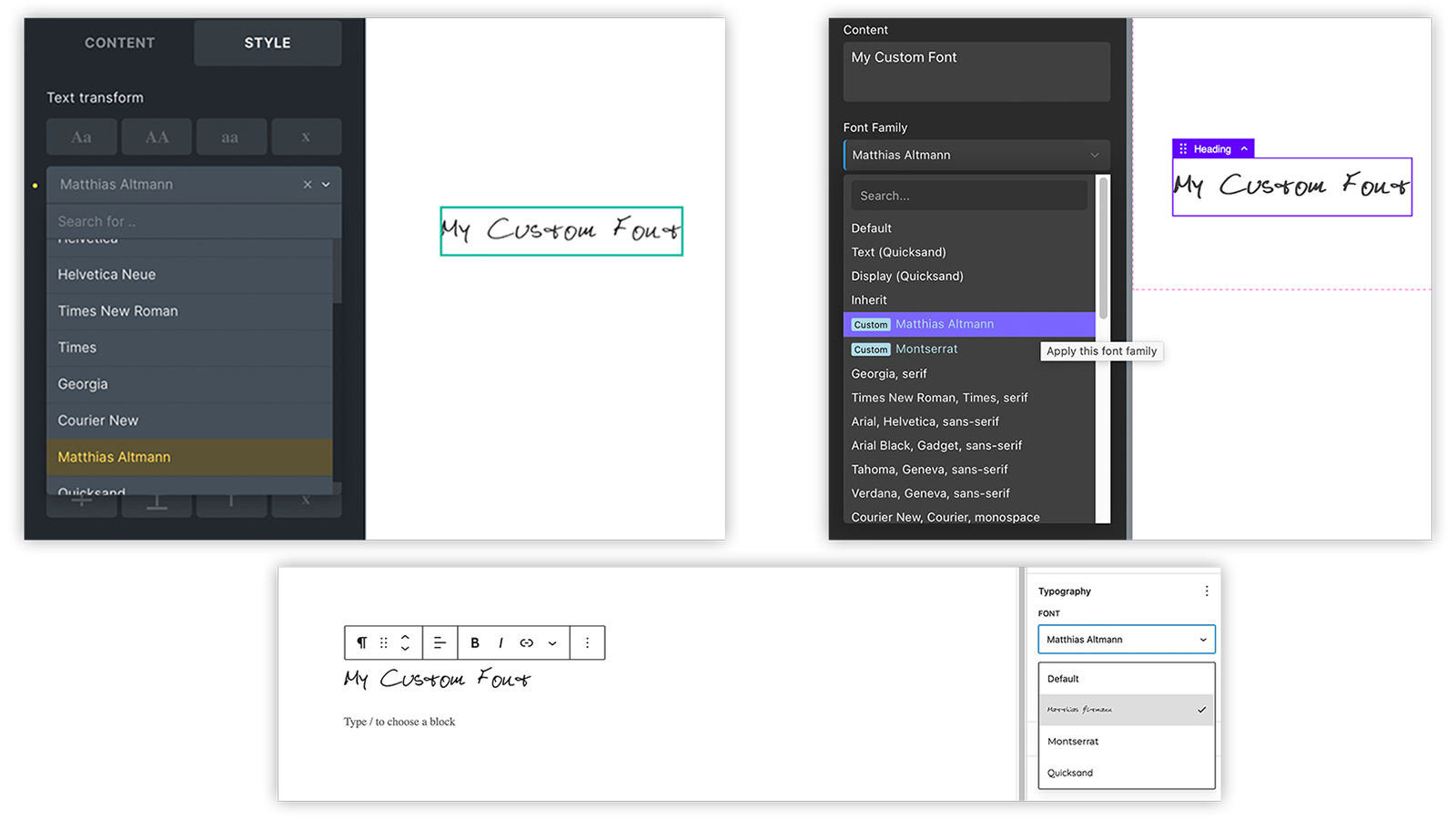
Seit MA Custom Fonts Version 3.4.0 stehen die Schriften auch im Gutenberg Editor zur Verfügung.
Anleitung
- Installiere MA Custom Fonts. Siehe Software Installation und Download.
- Auf Deinem Server wird automatisch ein neues Verzeichnis
wp-content/uploads/fontserstellt. - Nun kannst Du eigene Schriften und auch lokal gespeicherte Google Schriften einbinden.
Folge dazu einfach der entsprechenden nachfolgenden Anleitung.
Google bietet über seinen Dienst Google Fonts aktuell um die 2.000 Schriften an, die gemäß den Lizenzen der jeweiligen Ersteller kostenlos genutzt werden können.
Die Schriften können in die eigene Website eingebunden werden – allerdings nur über eine direkte Verbindung zu den Google Servern. Das ist im einigen Ländern aus Datenschutz-Gründen (DSGVO, GDPR, …) nicht so einfach zulässig. Zum Download bietet Google die Schriften nur im Format TTF an, das aufgrund der Dateigröße nicht für die Verwendung im Web geeignet ist.
Daher habe ich selbst einen Web-Dienst Web Font Loader entwickelt, der den Download der Google Schriften in den modernen und web-tauglichen Formaten WOFF2 und WOFF ermöglicht.
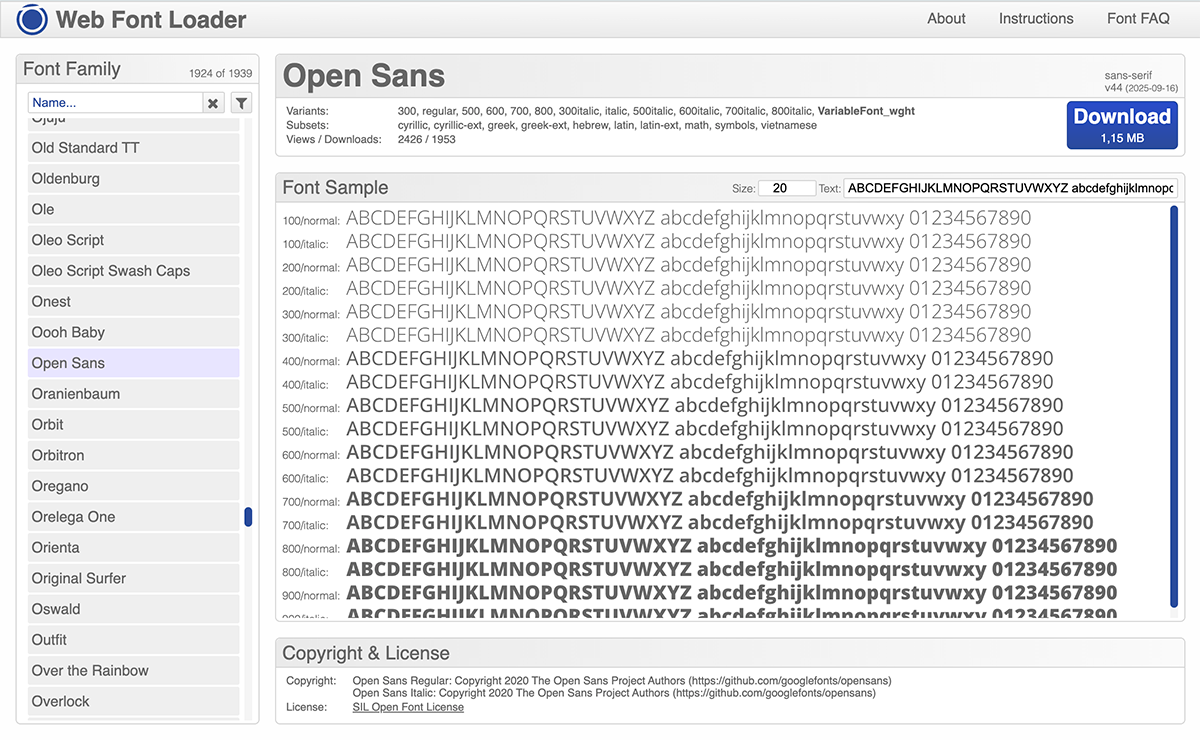
Suche Dir einfach die gewünschten Schriften aus und klicke den Download Button.
Du erhältst das Schrift-Paket als ZIP Datei. Entpacke diese ZIP Datei. Du siehst nun einen Ordner mit dem Namen der Schrift:
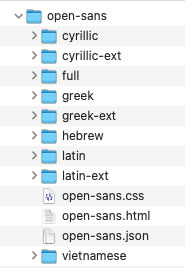
Lade den gesamten Ordner in das Verzeichnis wp-content/uploads/fonts auf Deinem Server hoch.
Alle Daten in diesem Ordner sind für die korrekte Einbindung und Bereitstellung der Schriften zwingend erforderlich.
MA Custom Fonts wird alle verfügbaren Schrift-Familien, -Stärken und -Stile und auch die verfügbaren Zeichensätze automatisch erkennen. Die notwendigen Informationen werden aus der beiliegenden JSON Datei gelesen.
Neu ab Version 3.2.6:
Seit dem Jahr 2016 unterstützen alle wichtigen Browser das Schriftformat WOFF2.
Eine neue Option in MA Custom Fonts verhindert, dass das alte Format WOFF dem Browser angeboten wird.
Dadurch wird vermieden, dass der Browser zusätzlich zu den WOFF2 Dateien ungewollt auch noch die WOFF Dateien lädt, wenn man beispielsweise auf der Seite Emoji oder Symbole verwendet.
Müssen ältere Browser, wie z.B. Internet Explorer oder Apple Geräte sehr alter Generationen, zwingend unterstützt werden, kann diese Option in den Einstellungen geändert werden.
Diese Option betrifft nur Schriften, die über den Web Font Loader herunter geladen wurden.
Schriften aus anderer Quelle werden weiterhin in allen verfügbaren Formaten bereit gestellt.
Lade Deine Schriftdateien in das Verzeichnis wp-content/uploads/fonts auf Deinem Server hoch.
Dateiformate
Bevorzugt sollten die Dateien moderne Formate wie WOFF2 und WOFF verwendet werden.
Es werden aber auch die Formate OTF und TTF unterstützt, die eigentlich nicht für die Benutzung im Web gedacht sind.
Dateien können auch in Unterordnern organisiert werden, z.B. gruppiert nach Schriftfamilie.
MA Custom Fonts findet alle Schriftdateien und erkennt die jeweiligen Schriftfamilien, -stärken und -stile automatisch.
Schriftfamilien, -stärken und -stile
Diese Details werden anhand der Dateinamen ermittelt.
Die Schriftfamilie wird aus dem Dateinamen der Schriftdatei abgeleitet.
Für die Schriftdatei „Matthias Altmann.woff2″ wird also die Schriftfamilie „Matthias Altmann“ verwendet.
Enthält der Dateiname Schlüsselworte für Schriftstärken, werden diese erkannt, nicht in die Schriftfamilie übernommen, sondern entsprechend im erzeugten CSS Code vermerkt.
Bitte beachten:
Seit Version 4.0.4 der Software müssen Schlüsselworte für Schriftstärken und -stile im Dateinamen klar erkennbar separiert sein, beispielsweise durch Bindestriche.
Folgende Stärken und Stile werden aktuell erkannt:
| Schriftstärke | Schlüsselworte |
|---|---|
| 100 | Thin |
| 200 | ExtraLight, UltraLight |
| 300 | Light |
| 400 | Normal, Regular, Book |
| 500 | Medium |
| 600 | Demi, DemiBold, SemiBold |
| 700 | Bold |
| 800 | ExtraBold, UltraBold |
| 900 | Black, Heavy |
Die Groß-/Kleinschreibung spielt bei den Schlüsselwörtern keine Rolle, und es können Bindestriche zwischen den Schlüsselwortteilen enthalten sein. ExtraLight wird also ebenso erkannt wie extra-light.
Auch numerische Werte in den Dateinamen (100, 200, …) werden als Schriftstärken erkannt.
Außerdem werden die Schlüsselwörter „italic“ und „oblique“ für den kursiven Schriftstil erkannt.
Bitte Schlüsselwörter mit einem Bindestrich separieren.
Existieren mehrere Schriftdateien mit dem gleichen Namen, aber unterschiedlichen Schriftformaten (woff2, woff, otf, ttf), wird die Schrift in Gutenberg und Buildern nur als ein Eintrag angezeigt. Das ausgegebene CSS enthält jedoch alle Schriftformate, und der Browser sucht sich das bevorzugte selbst aus.
Schriften mit variabler Stärke werden ebenfalls unterstützt: Werden im Dateinamen die Schlüsselworte VariableFont_wght oder [wght] (Groß-/Kleinschreibung egal) erkannt, wird das CSS automatisch für Schriften mit variabler Stärke angepasst.
Einstellungen
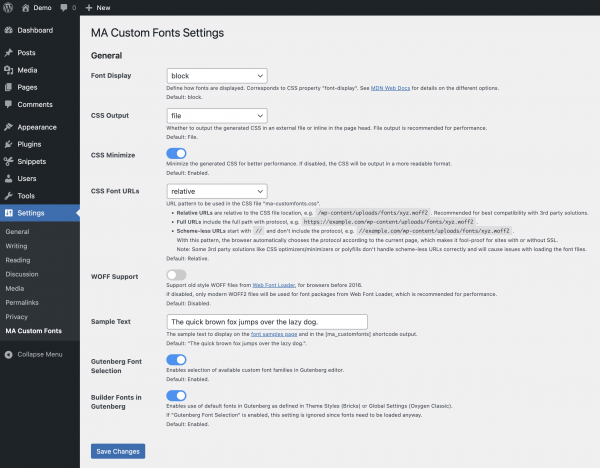
MA Custom Fonts erlaubt einige Konfigurationseinstellungen über Einstellungen > MA Custom Fonts in der deutschen WordPress Oberfläche, bzw. Settings > MA Custom Fonts in der englischen.
Test der Schriften
In MA Custom Fonts ist eine Test-Funktion implementiert, die eine Liste aller erkannten und registrierten Schriftfamilien, -stärken und -stilen ausgibt. Hier kann man die Einbindung und Darstellung der Schriften prüfen, auch in verschiedenen Schriftgrößen.
Test per Admin Funktion
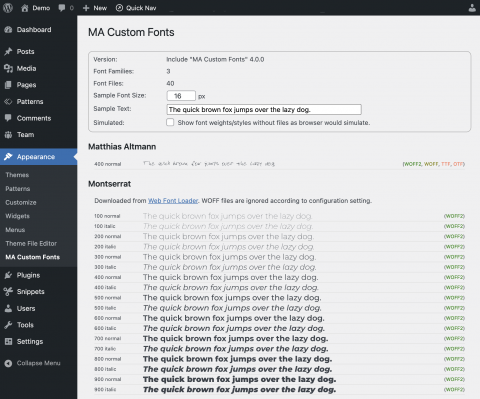
In der WordPress Administration gibt es unter Design (bzw. Appearance) einen Menüpunkt „MA Custom Fonts“.
Hier erhält man einen schnellen Überblick über die durch MA Custom Fonts registrierten Schriften.
Test per Shortcode
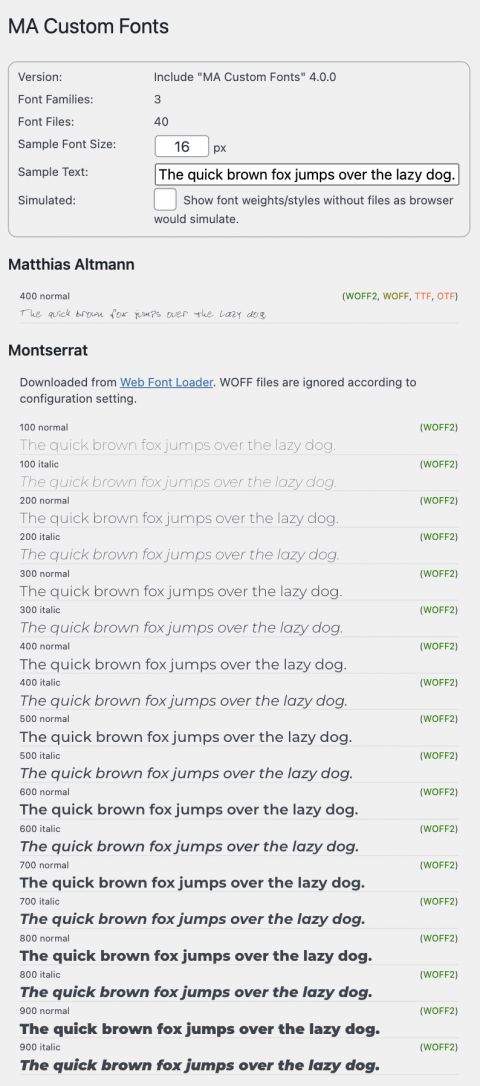
Es steht auch ein Shortcode [ma-customfonts-test] zur Verfügung.
Diesen Shortcode kann man z.B. auf einer neuen Seite im Gutenberg Editor eingeben. Mit dem Shortcode auf einer Seite kann man die Schriften einfach z.B. auf einem Smartphone testen.
Performance
Bei der Entwicklung habe ich viel Wert auf Effizienz und Performance gelegt.
Die Erkennung vorhandener Schriften und die Erzeugung des CSS Codes dauert auf einem durchschnittlichen Server nur Millisekunden.
Der CSS Code für die Schriften wird als CSS Datei verlinkt oder wahlweise eingebettet am Ende jeder Seite ausgegeben, egal, ob eine der Schriften verwendet wird oder nicht. Der Browser lädt eine Schrift jedoch nur, wenn sie wirklich benötigt wird, und dann auch nur in dem einen bevorzugten Format und den benötigten Stärken und Stilen.
Kompatibilität
Oxygen (Classic)
Bisher sind mir einige WordPress Plugins bekannt, die auf ähnliche Weise benutzerdefinierte Schriften in Oxygen (Classic) integrieren: „Core Framework“ *, „Elegant Custom Fonts“, „Oxy Font Manager“, „Swiss Knife“, „Use Any Font“.
Da sich die Art der Implementierung bzw. der technische Ansatz, Schriften in Oxygen zu integrieren, in diesen Plugins und MA Custom Fonts ähneln, sind diese Lösungen nicht kompatibel. Man muss sich für eine dieser Lösungen entscheiden. Also bitte vor Verwendung von MA Custom Fonts diese Plugins, bzw. bei „Swiss Knife“ den „Font Manager“ deaktivieren.
*) In Core Framework ab Version 1.9.3 kann die „Fonts Integration“ deaktiviert werden, was die Nutzung von MA Custom Fonts erlaubt.
Oxygen (Classic) bietet die Möglichkeit, Google Fonts direkt einzubetten.
Sollen Google Fonts mit MA Custom Fonts lokal auf dem eigenen Server gehostet werden, empfehle ich, die Google Fonts Unterstützung in Oxygen zu deaktivieren: Oxygen > Settings > Bloat Eliminator > Disable Google Fonts
Bricks
Zu Bricks sind mir keine Inkompatibilitäten bekannt.
Bricks bietet die Möglichkeit, Google Fonts direkt einzubetten.
Sollen Google Fonts mit MA Custom Fonts lokal auf dem eigenen Server gehostet werden, empfehle ich, die Google Fonts Unterstützung in Bricks zu deaktivieren: Bricks > Einstellungen > Performance > Google Fonts deaktivieren
FAQ – Häufig gestellte Fragen
Seit den 1990er Jahren gibt es das „True Type“ Format (TTF), mit dem Schriften auf einem Computer installiert werden konnten.
Ab den 2010er Jahren wurden dann weitere, immer optimiertere Schriftdatei-Formate für die Nutzung im Web entwickelt, nämlich OTF, WOFF und WOFF2.
WOFF2 ist das derzeit fortschrittlichste Format und wird von allen modernen Browsern unterstützt.
Nur noch wenige ältere Geräte, wie beispielsweise iPhones und iPads der ganz frühen Generationen können damit nichts anfangen und benötigen WOFF.
Nachfolgende Tabelle zeigt anhand der Schrift „Dinot“ die Datei-Größen der einzelnen Datei-Formate:
| Format | Datei-Größe |
|---|---|
| TTF | 52 KB |
| OTF | 44 KB |
| WOFF | 24 KB |
| WOFF2 | 16 KB |
Da eine Schrift aus mehreren Dateien für die verschiedenen Stärken und Stile bestehen kann, wird schnell klar, dass bei modernen Formaten wie WOFF und WOFF2 deutlich weniger Daten übertragen werden müssen.
Wenn man also eine eigene Schrift nur im Format TTF vorliegen hat, empfiehlt sich die Konvertierung nach WOFF oder WOFF2.
Unter dem Suchbegriff „Font Converter“ findet man im Internet hierfür zahlreiche kostenlose Online-Dienste.
Ja.
Für den Download von Google Fonts in modernen Web-Formaten habe ich einen eigenen Service Web Font Loader entwickelt, der perfekt auf die Verwendung mit MA Custom Fonts abgestimmt ist.
Zu beachten: (Oxygen)
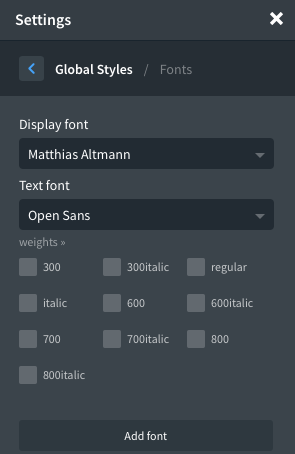
MA Custom Fonts sucht nach Schriftdateien und fügt sie der Oxygen Schriftenliste hinzu.
Oxygen bietet jedoch im Standard bereits einige Google Fonts in der Schriftenliste an.
Wenn wir beispielsweise die Google Schrift „Roboto“ herunter laden und lokal bereitstellen, wird sie MA Custom Fonts der Schriftenliste hinzufügen.
Oxygen fügt selbst die Google Schrift „Roboto“ hinzu. „Roboto“ ist also nun zwei mal in der Liste enthalten: Einmal als lokale Schrift (in hellblau dargestellt) und einmal als Google Schrift (in weiß dargestellt).
Erschwerend kommt noch hinzu, dass in Oxygen auch mit der aktivierten Option „Disable Google Fonts“ trotzdem 20 Google Schriften in der Schriftauswahl angezeigt werden, und mit der Suche nach Schriften Google Fonts angeboten werden. Dies ist dem Oxygen Team bekannt, es gibt aber aktuell noch keine Lösung hierfür.
Ich empfehle, in Oxygen die Unterstützung für Google Fonts abzuschalten: Oxygen > Settings > Bloat Eliminator > Disable Google Fonts
In den Oxygen Global Settings kann man für Google Fonts festlegen, in welchen Schriftstärken sie eingebettet werden sollen. Damit kann man einschränken, welche Schriftstärken vom Google Fonts Server geladen werden, und damit bei nur wenigen benutzten Schriftstärken die Dateigröße reduzieren.
Bei den eigenen Schriften, die über MA Custom Fonts eingebettet werden, stehen alle Schriftdateien schon auf dem eigenen Server bereit. Gewöhnlich gibt es von einer Schriftfamilie für jede Schriftstärke eine eigene Schriftdatei. All diese bereit gestellten Schriftdateien, und damit die verschiedenen Schriftstärken werden dem Browser angeboten. Der Browser lädt jedoch nur die Schriftdateien mit den Schriftstärken, die wirklich zur Anzeige der Seite benötigt werden.
Es gibt also gar keinen Grund, für unsere eigenen Schriften die Schriftstärken in den Oxygen Global Settings einzuschränken.
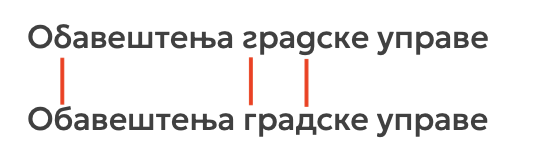
In Einzelfällen werden kyrillische Zeichen in bestimmten Sprachen mit bestimmten Schriften nicht korrekt dargestellt. Die folgende CSS Regel behebt dieses Problem:
* {
  -webkit-font-feature-settings: "locl" 0;
  -moz-font-feature-settings:    "locl" 0;
  -ms-font-feature-settings:     "locl" 0;
  font-feature-settings:         "locl" 0;
  -webkit-locale: auto;
}
Software Installation und Aktualisierung
Installation
Die Installation der Software kann mit unterschiedlichen Verfahren erfolgen:
Plugin:
Die Software steht als Plugin (ZIP Archiv) zur Verfügung und kann in WordPress als Plugin installiert werden.
Code Snippet:
Die Software ist als Code Snippet lauffähig.
Für die Plugins „Code Snippets“ und „Advanced Scripts“ wird eine JSON Datei zum Download angeboten, die dort direkt importiert werden kann.
PHP:
Die Software kann als PHP Datei herunter geladen werden.
Diese PHP Datei kann in anderen Code Snippet Plugins verwendet werden (den Code per Copy & Paste einfügen), oder in ein eigenes WordPress Child Theme eingebunden werden (require_once('path/to/the.php');).
Aktualisierung
Die Software prüft selbständig, ob Aktualisierungen verfügbar sind:
Plugin:
Die Aktualisierung folgt den bekannten WordPress Methoden: Alle 12 Stunden wird geprüft, ob eine neue Version verfügbar ist.
Das Update kann dann manuell, oder auch automatisch erfolgen.

Code Snippet & PHP:
Die Software implementiert eine spezielle Methode, die auch bei der Installation als Snippet oder PHP Include eine Prüfung auf Aktualisierungen durchführt. Das Prüfintervall ist, wie bei Plugins, auf 12 Stunden festgelegt.
Steht eine neuere Version zur Verfügung, wird dies im Admin Bereich als Hinweis eingeblendet:

Download
Spenden ❤️
Es macht mir viel Freude, Software zu entwickeln und damit typische Anforderungen zu lösen.
Die Software stelle ich kostenfrei zur Nutzung zur Verfügung.
Wenn Du möchtest, kannst Du meine vielen Stunden Arbeit mit einer kleinen Kaffee-Spende über PayPal honorieren.
Bei Klick auf den Button wird eine Verbindung zu PayPal aufgebaut.
Spenden werden selbstverständlich ordnungsgemäß durch mich versteuert.
Disclaimer
Diese Software habe ich nach bestem Wissen und Gewissen entwickelt und getestet.
Ich stelle die Software kostenfrei zur Nutzung zur Verfügung.
Eine Garantie für die Funktionalität in allen denkbaren WordPress Umgebungen kann ich nicht geben.
Download und Nutzung dieser Software erfolgen auf eigene Gefahr und Verantwortung.
Change Log
- Version 4.0.55. Juli 2026Erfordert mindestens WordPress: 6.1•Getestet bis WordPress: 7.0•Erfordert PHP: 8.0
Fixes:
- An incorrect path was displayed in error messages related to the fonts base folder.
- Now using
wp_is_writable()instead ofis_writable()for the writable test on the fonts base folder,
because PHP's original function may fail on Windows servers - Added additional check to ensure the relative font URL always starts with a slash.
(Thanks to Julian D. for analysis, reporting, solution suggestions for all three issues)
- Version 4.0.43. Juli 2026Erfordert mindestens WordPress: 6.1•Getestet bis WordPress: 7.0•Erfordert PHP: 8.0
Fixes:
- For custom fonts, the style detection from filename might have accidentally detected parts of the font name
as weight keywords.
Sample: RobotoSemiCondensed-100 was wrongly detected as weight 600 because of the keyword "semi".
Fixed by changing the regex to respect word boundaries.
(Thanks to Ves Rumyantsau for analysis, reporting, solution suggestion) - A Web Font Loader json file misplaced in the root font folder might have caused custom fonts to be ignored.
Changes
- Renamed Plugin title from "MA CustomFonts" to "MA Custom Fonts" to match all other references.
Tested:
- Bricks 2.3.8
- For custom fonts, the style detection from filename might have accidentally detected parts of the font name
- Version 4.0.3Download nicht verfügbar.13. Juni 2026Erfordert mindestens WordPress: 6.1•Getestet bis WordPress: 7.0•Erfordert PHP: 8.0
Fixes:
- Setting "CSS Font URLs" (relative/full/schemeless) was ignored due to order of initialization.
(Thanks to Albert Calzada for reporting)
Changes:
- Settings: Auto-sizing for input fields, theme color for toggles
- Font Samples: Auto-sizing for input field, improved responsive layout
Tested:
- Bricks 2.3.7
- Setting "CSS Font URLs" (relative/full/schemeless) was ignored due to order of initialization.
- Version 4.0.2Download nicht verfügbar.21. Mai 2026Erfordert mindestens WordPress: 6.1•Getestet bis WordPress: 7.0•Erfordert PHP: 8.0
Changes:
- Moved plugin updater methods to separate class to reduce code snippet size.
Tested:
- WordPress 7.0
- Version 4.0.1Download nicht verfügbar.15. Mai 2026Erfordert mindestens WordPress: 6.1•Getestet bis WordPress: 6.9.4•Erfordert PHP: 8.0
Fixes:
- When using a combination of custom fonts and font packages from Web Font Loader, the custom fonts may not
have been properly recognized. - Font Manager: Viewer info was displayed with escaped html, crippling the link to Web Font Loader for WFL.
- Fixed PLUGIN URI for "Visit plugin site" link
Tested:
- PHP 8.5
- Bricks 2.3.5
Minimum requirements:
- PHP 8.0
- WordPress 6.1
- When using a combination of custom fonts and font packages from Web Font Loader, the custom fonts may not
- Version 4.0.0Download nicht verfügbar.10. Mai 2026Erfordert mindestens WordPress: 5.8•Getestet bis WordPress: 6.9.4•Erfordert PHP: 7.4
New Features:
- Now available as Code Snippet, Include, and Plugin with automatic update check.
For snippet or include, checks for updates every 12 hrs (same frequency used by WP for plugin updates),
and shows update notice in admin area, dismissible for 12 hrs. Can also be checked manually on the Settings page.
For plugin, WordPress standard update mechanism is used. - Settings > MA Custom Fonts
- Configure all settings for the font integration.
- If settings have changed, the CSS file will be regenerated automatically.
- Appearance > Font Manager ** EXPERIMENTAL BETA
- Brand new UI for managing folders and files in the /wp-content/uploads/fonts folder.
- Only available in the Plugin version.
Changes:
- Removed support of obsolete font formats EOT and SVG, that are not supported by any browser since 2013/2018.
Fixes:
- Nested folder structures could result in falsely detecting a font as part of a WFL package
- Font sample page order of font formats was not according to prioritized order.
- Now available as Code Snippet, Include, and Plugin with automatic update check.
- Version 3.4.5Download nicht verfügbar.19. Januar 2026Erfordert mindestens WordPress: 5.8•Getestet bis WordPress: 6.9•Erfordert PHP: 7.4
Compatibility:
- Core Framework 1.9.3 added a toggle "Disable Fonts Integration".
Disabling Fonts Integration allows the use of MA Custom Fonts with Oxygen Builder.
(Thanks to Luke Allen from the Core Framework dev team for adding this toggle and providing a related compatibility check code sample.)
- Core Framework 1.9.3 added a toggle "Disable Fonts Integration".
- Version 3.4.4Download nicht verfügbar.29. August 2025
Fixes:
- Fixed font base URL for WP setup in subdirectory
(Thanks to Salomon van Riesen and Chanan Strauss for reporting)
- Fixed font base URL for WP setup in subdirectory
- Version 3.4.3Download nicht verfügbar.8. Juni 2025
New Feature Preview:
- Initial inofficial support for WordPress FSE Site Editor (Full Site Editing) themes.
Custom fonts are now available in the Site Editor, too.
The custom fonts are listed in the "Typography" section of the "Styles" panel.
Changes:
- Font URL pattern in
ma-customfonts.csscan now be configured to use'relative','full'or'scheme-less'URLs. Default is 'relative'.
This improves compatibility with CDNs, 3rd party CSS optimizers/minimizers, and some polyfills. - Implemented QueryMonitor timing
- Added "Core Framework" to incompatibilities if installed together with Oxygen Builder
- Initial inofficial support for WordPress FSE Site Editor (Full Site Editing) themes.
- Version 3.4.2Download nicht verfügbar.15. März 2024
Fixes:
- Fixed PHP warning in
admin_init()line 818:$_REQUEST['page']might not be defined when using Bricks.
- Fixed PHP warning in
- Version 3.4.1Download nicht verfügbar.4. März 2024
Changes:
- Builder fonts in Gutenberg: Call of Oxygen function
ct_get_global_settingsembedded incall_user_func()to avoid being marked as unknown in Bricks setups.
Fixes:
- Fixed PHP warning in
admin_init(): Variable$builder_fonts_to_gutenbergdefinition was inside of Oxygen block, hence undefined in Bricks block.
- Builder fonts in Gutenberg: Call of Oxygen function
- Version 3.4.0Download nicht verfügbar.25. Februar 2024
Reorganization of code base.
New Features:
- Support for assigning fonts in Gutenberg.
Can be disabled by setting$gutenberg_font_family_select = false; - Oxygen Builder: Hide "Top 20" Google Fonts if Google Fonts are disabled.
- Added filter for excluding ma-customfonts.css from FlyingPress CSS minimizer which causes issues with already minimized CSS containing
@font-facerules.
Changes:
- Changed CSS file name from
ma_customfonts.csstoma-customfonts.css - Changed test page slug from
ma_customfontstoma-customfonts - Removed setting
$recursivefor font file scan. Always scan recursive. - Added compatibility check for "Oxy Font Manager"
- Oxygen Builder font lists now show "Custom" badge for injected fonts
- Custom Fonts Test now loads CSS using URL parameter
ver=to ensure proper refresh. - Setting
$fonts_in_gutenbergchanged to$builder_fonts_in_gutenberg(Bricks, Oxygen) - Setting renamed:
$cssoutputto $css_output,$cssminimizeto $css_minimize,$fontdisplayto$font_display $timingnow allows levels 0/false (off), 1/true (basic), 2 (extended)$timingnow also calculates memory usage. Please note that memory usage won't simply be cummulated. Methods use memory temporarily but also free memory after use.
- Support for assigning fonts in Gutenberg.
- Version 3.3.1Download nicht verfügbar.17. Oktober 2022
Changes:
- Migrated JavaScript from jQuery to vanilla JS (ES6) to eliminate jQuery dependency.
- Modernized initialization to avoid errors with WPCodeBox:
Replaced @ error control operator with ?? null coalescing operator
(Thanks to Alexander van Aken for reporting)
- Version 3.3.0Download nicht verfügbar.26. September 2022
New Features:
- Custom Fonts are now also available in Bricks Builder. They are listed in section "Standard Fonts".
(Thanks to Luke Wakefield for the implementation idea and to Tom Homer for contacting and informing me about Luke's solution) - New configuration option
$fonts_in_gutenberg:
Allows to enable (default) or disable the assignment of custom fonts in Gutenberg.
Changes:
- Renamed code snippet from "MA Oxygen Custom Fonts" to "MA Custom Fonts"
Fixes:
- The snippet applies display and text fonts defined in Oxygen to Gutenberg Editor.
Google fonts defined in Oxygen are not loaded for Gutenberg.
So we can't assign Google fonts to Gutenberg. Only custom fonts are now assigned.
(Thanks to Kamil Alhaijali for reporting)
- Custom Fonts are now also available in Bricks Builder. They are listed in section "Standard Fonts".
- Version 3.2.7Download nicht verfügbar.19. September 2022
Compatibility Fix:
- In Oxygen 4.0.4, Pro Menu calls
ECF_Plugin::get_font_families()as Ajax call.
For performance reasons, MA Custom Fonts doesn't get initialized for Ajax calls and doesn't have the base font directory set, which causes an error.
We now just return an empty custom fonts list to prevent this error. That doesn't impact the Pro Menu functionality.
(Many thanks to Kevin Pudlo from the Oxygen development team for reporting, support and testing concerning the Pro Menu component, and Alexander van Aken for reporting a similar issue concerning the Mega Menu component.)
- In Oxygen 4.0.4, Pro Menu calls
- Version 3.2.6Download nicht verfügbar.2. Juni 2022
New Features:
- New configuration option
$wfl_support_woff:
Font packages downloaded from Web Font Loader (https://webfontloader.altmann.de/) contain WOFF2 files supported by all modern browsers, and also WOFF files to support ancient browsers before 2016 like Internet Explorer, or Safari on older Apple devices.
The new default setting is to NOT provide old style WOFF files for ancient browsers.
Set this option totrueif you still need to support old browsers before 2016.
(Many thanks to Sunny Trochaniak and Yan Kiara for reporting issues and supporting investigations with unexpected WOFF loading when using symbols/emoji) - Added display of timing details at end of page Appearance > MA Custom Fonts
Fixes:
- Corrected initialization of dummy ECF plugin to let Oxygen detect custom fonts and prevents attempts to be loaded as Google fonts
(Thanks to Firat Sekerli for reporting)
Changes:
- Removed configuration and all code for debugging.
- For Web Font Loader fonts: Only emit CSS if related font file exists.
User might have deleted e.g. the files for a specific language.
- New configuration option
- Version 3.2.5Download nicht verfügbar.25. März 2022
New Features:
- Legend and coloring for font formats in custom fonts test screen
Changes:
- Renamed Admin menu Appearance > "Custom Fonts" to "MA Custom Fonts"
- Renamed test shortcode from "
maltmann_custom_fonts_test" to "ma-customfonts-test" - Optimized handling of font_base (dir, url) by class var
- Enhanced detection of variable weight fonts by
[wght]in filename
(Thanks to Paul Batey for reporting) - Adapted min/max font weight for variable fonts from 100/900 to 1/1000 according to https://developer.mozilla.org/en-US/docs/Web/CSS/@font-face/font-weight#values
(Thanks to Paul Batey for reporting) - Completely re-built custom font test screen (WP Admin and Shortcode) to improve
- variable weight fonts (display logic)
- responsive view (for test on smartsphones)
- VersionDownload nicht verfügbar.11. Februar 2022
Tested with PHP 8.0, WordPress 5.9, Oxygen 4.0 beta 1
- Version 3.2.4Download nicht verfügbar.26. Oktober 2021
Changes:
- Deferred initialization to hook
wp_loaded, after incompatibility checks - Gutenberg: Apply custom fonts for new posts also
- Renamed IDs (for scripts and styles) and CSS classes (for font test) for consistency
Performance:
- Avoid unneccessary init by separating admin/frontend and more detailed checks
Fixes:
- Fixed an issue comparing hashes for code and file
(Thanks to David Sitniansky for reporting) - Emit styles for Gutenberg correctly if
$cssoutputis configured as'html'
- Deferred initialization to hook
- Version 3.2.3Download nicht verfügbar.15. Oktober 2021
Changes:
- Gutenberg: Use display font for post title
(Thanks to Sunny Trochaniak for reporting) - Fonts preview: Changed sample text size from 15 to 16 px which is browser standard
- Fonts preview: Shortcode output uses WP system fonts for UI instead of custom fonts
- CSS file link now contains
?ver=...instead of?hashonly
Performance:
- Only create CSS file if contents (font configuration) have changed
Fixes:
- Removed
itemprop="stylesheet"from<link rel="stylesheet" ...>
(Thanks to Max Gottschalk for reporting and testing) - Proper quoting for font families
- Gutenberg: Use display font for post title
- Version 3.2.2Download nicht verfügbar.2. August 2021
Changes:
- Using scheme-less URL to avoid issues with wrong WordPress URL configuration
- Added admin notice if folder
wp-content/uploads/fontsis not writable.
Fixes:
- Fixed issue with uppercase font file extensions.
- Version 3.2.1Download nicht verfügbar.18. Juni 2021
Fixes:
- Fixed typo in CSS for Gutenberg
- Version 3.2.0Download nicht verfügbar.18. Juni 2021
New Features:
- Display Custom Fonts in Gutenberg (enqueue
ma_customfonts.cssfor font definitions, add custom style for display and text font from Oxygen global settings)
Changes:
- Auto-create folder
/wp-content/uploads/fonts
- Display Custom Fonts in Gutenberg (enqueue
- Version 3.1.3Download nicht verfügbar.17. Mai 2021
Changes:
- Optimized init sequence
- Emit implementation and version in CSS
- Reversed Version History order
- Version 3.1.2Download nicht verfügbar.16. Mai 2021
Changes:
- Avoid font swap: Load
ma-customfonts.cssearly; default font-display now "block"
New Features:
- Allow space in addition to dashes to detect font weights and styles
(Thanks to Henning Wechsler for reporting)
- Avoid font swap: Load
- Version 3.1.1Download nicht verfügbar.21. März 2021
Fixes:
- Fixed font loading in Gutenberg editor (with Oxygen Gutenberg Integration)
- Version 3.1.0Download nicht verfügbar.20. März 2021
New Features:
- "Oblique" in font file name is now detected as italic style
- Custom Fonts test: Option to show font weights/styles without files as browser would simulate.
Changes:
- Output Custom Font CSS in head instead of footer to prevent font swap
- Custom Fonts test: Changed logic for output font samples and related file info
Fixes:
- Custom Fonts test: Fixed font file count for fonts provided by Web Font Loader
- Version 3.0.2Download nicht verfügbar.8. März 2021
Fix:
- Compatibility with Windows server and local dev environments.
(Thanks to Franz Müller for reporting and testing)
- Compatibility with Windows server and local dev environments.
- Version 3.0.1Download nicht verfügbar.23. Februar 2021
Fixes:
- Compatibility with WordPress 5.6.2 (doesn't set
REQUEST::actionanymore) - Compatibility check with Swiss Knife's Font Manager feature
- Compatibility with Swiss Knife (font lists did not display custom fonts light blue)
- Compatibility with WordPress 5.6.2 (doesn't set
- Version 3.0.0Download nicht verfügbar.18. Februar 2021
New Features:
- Support for font packages from Web Font Loader (https://webfontloader.altmann.de/)
- New configuration option: CSS output as inline CSS or external CSS file (cacheable)
- New configuration option: CSS minimize (was controlled by debug switch before)
- Changed configuration option:
font-displaymay now be specified as desired, default is now 'auto'
- Version 2.5.2Download nicht verfügbar.24. Januar 2021
New Features:
- Custom Fonts test (via Admin panel and shortcode) now allows custom sample text
- Version 2.5.1Download nicht verfügbar.23. Januar 2021
Fix:
- Changed compatibility check process:
Changed Hook for plugin compatibility check fromplugins_loadedtoinit
Check only if admin and functionis_plugin_activeexists
(Thanks to Sebastian Albert for reporting and testing)
- Changed compatibility check process:
- Version 2.5.0Download nicht verfügbar.23. Januar 2021
New features:
- WP Admin Menu: Appearance > Custom Fonts
Shows a list of all registered custom fonts, including samples, weights, formats with adaptable sample font size - Detect font weight terms "Book" (400) and "Demi" (600)
Changes:
- Redesign of classes (MA_CustomFonts, ECF_Plugin)
- Font swap is now a configuration option
- Cut "-webfont" from font name
- WP Admin Menu: Appearance > Custom Fonts
- Version 2.2.5Download nicht verfügbar.8. Dezember 2020
Changes:
- In CSS, font sources are now listed in a prioritized order (eot,woff2,woff,ttf,otf,svg)
(Thanks to Viorel Cosmin Miron for reporting) - Test shortcode now also displays available font formats
- In CSS, font sources are now listed in a prioritized order (eot,woff2,woff,ttf,otf,svg)
- Version 2.2.4Download nicht verfügbar.27. November 2020
Fix:
- Corrected typo in variable name (2 occurrences) that could cause repeated search for font files.
(Thanks to Viorel Cosmin Miron for reporting)
- Corrected typo in variable name (2 occurrences) that could cause repeated search for font files.
- Version 2.2.3Download nicht verfügbar.25. November 2020
Changes:
- In Oxygen font selectors the custom fonts are now displayed in lightblue to distinguish from default, websafe and Google Fonts
- Version 2.2.2Download nicht verfügbar.25. November 2020
New features:
- Partial support for fonts with variable weights, detected by "VariableFont" in filename. CSS output as
font-weight:100 900;
- Partial support for fonts with variable weights, detected by "VariableFont" in filename. CSS output as
- Version 2.2.1Download nicht verfügbar.24. November 2020
New features:
- Shortcode
[ maltmann_custom_font_test ]for listing all custom fonts with their weights and styles
Changes:
- Fonts are now sorted alphabetically for e.g. CSS output
- Added more request rules to skipping code execution when not needed
- Shortcode
- Version 2.2.0Download nicht verfügbar.23. November 2020
New features:
- Detection of font weight from number values
- CSS now contains
font-display:swap;
- Version 2.1.1Download nicht verfügbar.3. Oktober 2020
Fix:
- Handle empty fonts folder correctly.
(Thanks to Mario Peischl for reporting) - Corrected title and file name (typo "cutsom") of Code Snippet
- Handle empty fonts folder correctly.
- Version 2.1.0Download nicht verfügbar.16. September 2020
New features:
- Detection of font weight and style from file name
Fixes:
- EOT: Typo in extension detection
- EOT: Missing quote in style output
- Version 2.0.0Download nicht verfügbar.15. September 2020
Improved version
- Finds all font files (eot, otf, svg, ttf, woff, woff2) in directory
wp-content/uploads/fonts/ - Optionally recursive
- Takes font name from file name
- Emits optimized CSS with alternative font formats
- Special handling for EOT for Internet Explorer
- Finds all font files (eot, otf, svg, ttf, woff, woff2) in directory
- Version 1.0.0Download nicht verfügbar.10. April 2020
Initial version for client project