
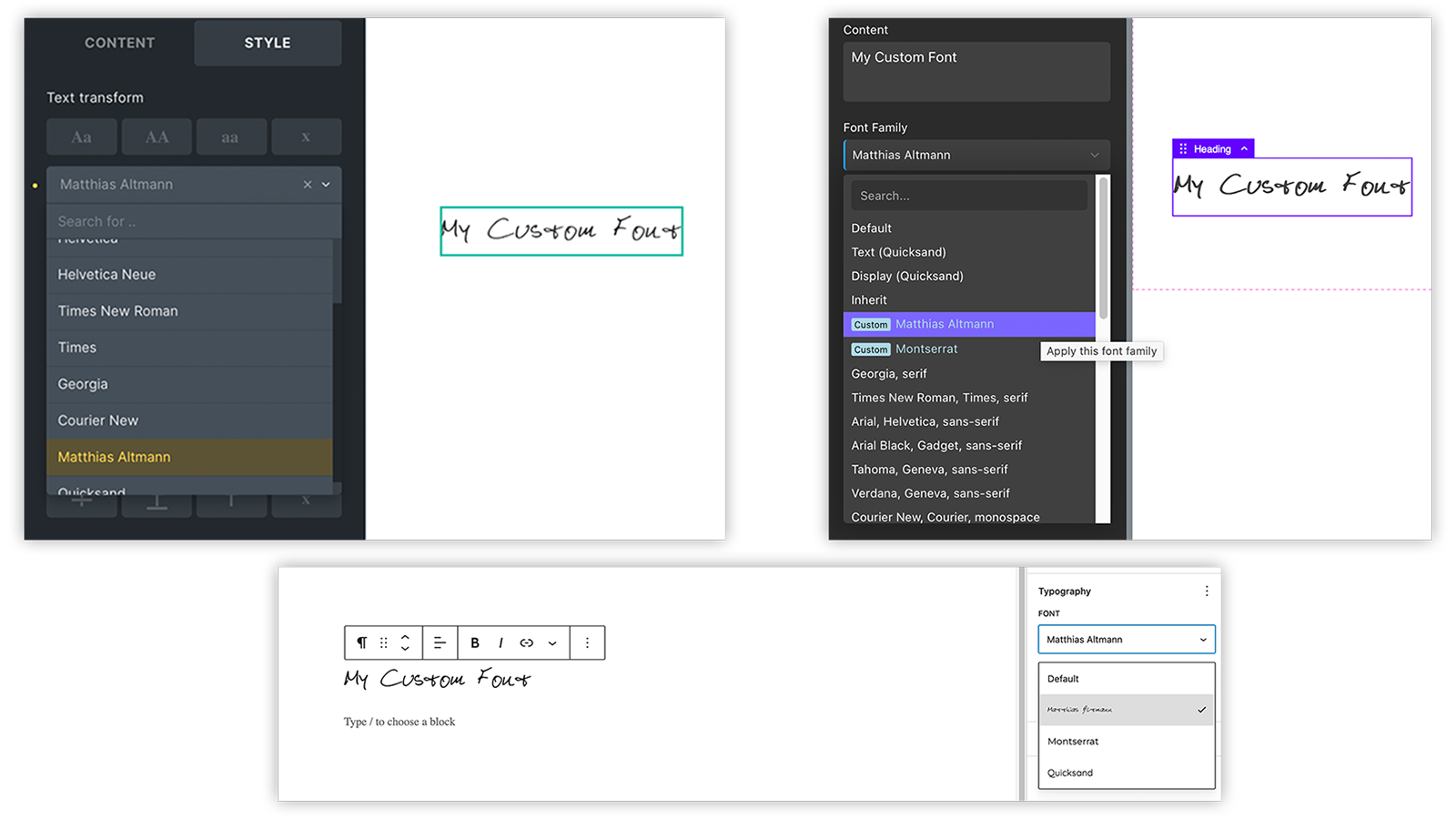
Introduction
Modern web design thrives on the use of custom fonts.
Most often, commercial fonts or one of the free Google fonts are used.
Some WordPress themes and plugins, as well as builders like Bricks and Oxygen (Classic), allow for the direct use of Google fonts. It is also possible in some cases to integrate your own fonts, but this is often cumbersome.
Legal Restrictions for Google Fonts
In some countries, the direct integration of Google fonts is problematic due to data protection regulations (GDPR, DSGVO, …).
Instead, Google fonts must be stored on your own server.
Cumbersome Integration of Custom Fonts
Most existing solutions for integrating your own fonts require you to upload the individual font files with the respective font family, style and weight. Depending on the number and variants of the font files, this is a time-consuming and cumbersome process.
Solution
MA Custom Fonts simplifies the provision and integration of your own fonts:
The font files can simply be uploaded to a folder on your own server. MA Custom Fonts automatically recognizes the font family, style and weight based on the file names. Fonts with variable weights are also supported.
For the easy integration of locally stored Google fonts I have developed the Web Font Loader :
Using this service, Google fonts can be easily downloaded in modern formats and uploaded to your own server.
MA Custom Fonts recognizes these fonts and integrates them automatically, including support for variable font weights and Unicode ranges, if available.
Since version 3.4.0 of MA Custom Fonts, the fonts are also available in the Gutenberg Editor.
Instructions
- Install MA Custom Fonts. See Software Installation and Download.
- A new directory
wp-content/uploads/fontswill be created automatically on your server. - Now you can add your own fonts and also locally stored Google Fonts.
Just follow the corresponding instructions below.
Google currently offers around 2,000 fonts via its Google Fonts service, which can be used free of charge in accordance with the licenses of the respective creators.
The fonts can be integrated into your own website – but only via a direct connection to the Google servers. This is not easily permitted in some countries for data protection reasons (DSGVO, GDPR, …). For download, Google offers the fonts only in TTF format, which is not suitable for use on the web due to the file size.
Therefore, I have developed a web service Web Font Loader, which allows downloading Google fonts in modern and web-ready formats WOFF2 and WOFF.
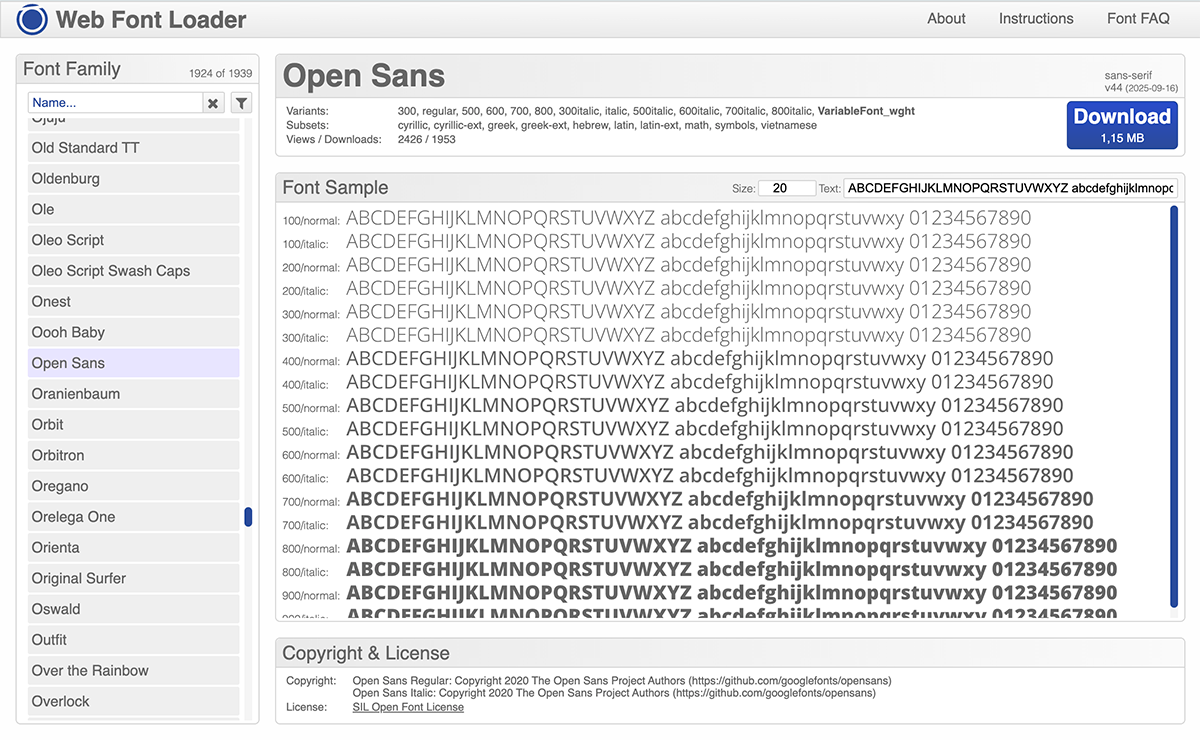
Just choose the fonts you want to use and click the download button.
You will receive a ZIP file. Unzip this ZIP file. You will see a folder with the name of the font:
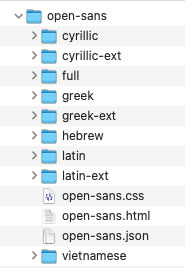
Upload the entire folder to the wp-content/uploads/fonts directory on your server.
All files in this folder are essential for the proper embedding and delivery of the fonts.
MA Custom Fonts will automatically detect all available font families, weights, styles and also the available charsets. The necessary information is read from the included JSON file.
New as of version 3.2.6:
Since 2016, all major browsers support the WOFF2 font format.
A new setting in MA Custom Fonts prevents the old WOFF format from being offered to the browser.
This avoids that the browser unintentionally loads the WOFF files in addition to the WOFF2 files, for example, when emojis or symbols are used on the page.
If older browsers, such as Internet Explorer or very old generation Apple devices, must be supported, this option can be changed in the settings.
This option only affects fonts downloaded from the Web Font Loader.
Fonts from other sources will still be provided in all available formats.
Upload your font files to the wp-content/uploads/fonts directory on your server.
File Formats
Preferably, files should be in modern formats such as WOFF2 and WOFF.
However, OTF and TTF formats are also supported, even though they are not actually intended for use on the web.
Files can also be organized into subfolders, e.g., grouped by font family.
MA Custom Fonts finds all font files and automatically recognizes the respective font families, weights, and styles.
Preferably the files should have modern formats like WOFF2 and WOFF.
Font Files, Names, Weights and Styles
These details are determined based on the file names.
The font family is derived from the file name of the font file.
For the font file “Matthias Altmann.woff2”, the font family “Matthias Altmann” is therefore used.
If the file name contains keywords for font weights, these are recognized but not included in the font family; instead, they are noted accordingly in the generated CSS code.
Please note:
Starting with version 4.0.4 of the software, keywords for font weights and styles must be clearly separated in the file name, for example, by hyphens.
The following weights and styles are currently recognized:
| Font Weight | Keywords |
|---|---|
| 100 | Thin |
| 200 | ExtraLight, UltraLight |
| 300 | Light |
| 400 | Normal, Regular, Book |
| 500 | Medium |
| 600 | Demi, DemiBold, SemiBold |
| 700 | Bold |
| 800 | ExtraBold, UltraBold |
| 900 | Black, Heavy |
The keywords are not case sensitive and may contain hyphens between the keyword parts.ExtraLight is therefore recognized in the same way as extra-light.
Numeric values (100, 200, …) in the file names are also recognized as font weights.
Furthermore, the keywords “italic” and “oblique” are recognized for the italic font style.
Please separate the keyword with a hyphen.
If there are multiple font files with the same name but different font formats (woff2, woff, otf, ttf), the font will appear as a single entry in Gutenberg and page builders. However, the generated CSS includes all font formats, and the browser selects the preferred one on its own.
Fonts with variable weights are also supported: If the keywords VariableFont_wght or [wght] (case-insensitive) are recognized in the file name, the CSS is automatically adjusted for fonts with variable weights.
Settings
MA Custom Fonts allows you to configure certain settings via Settings > MA Custom Fonts.
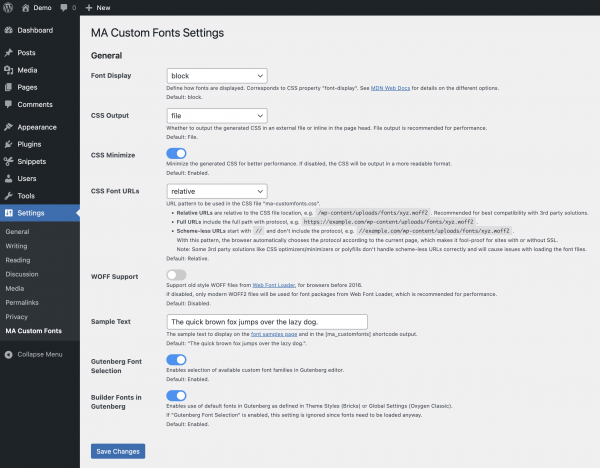
Testing the fonts
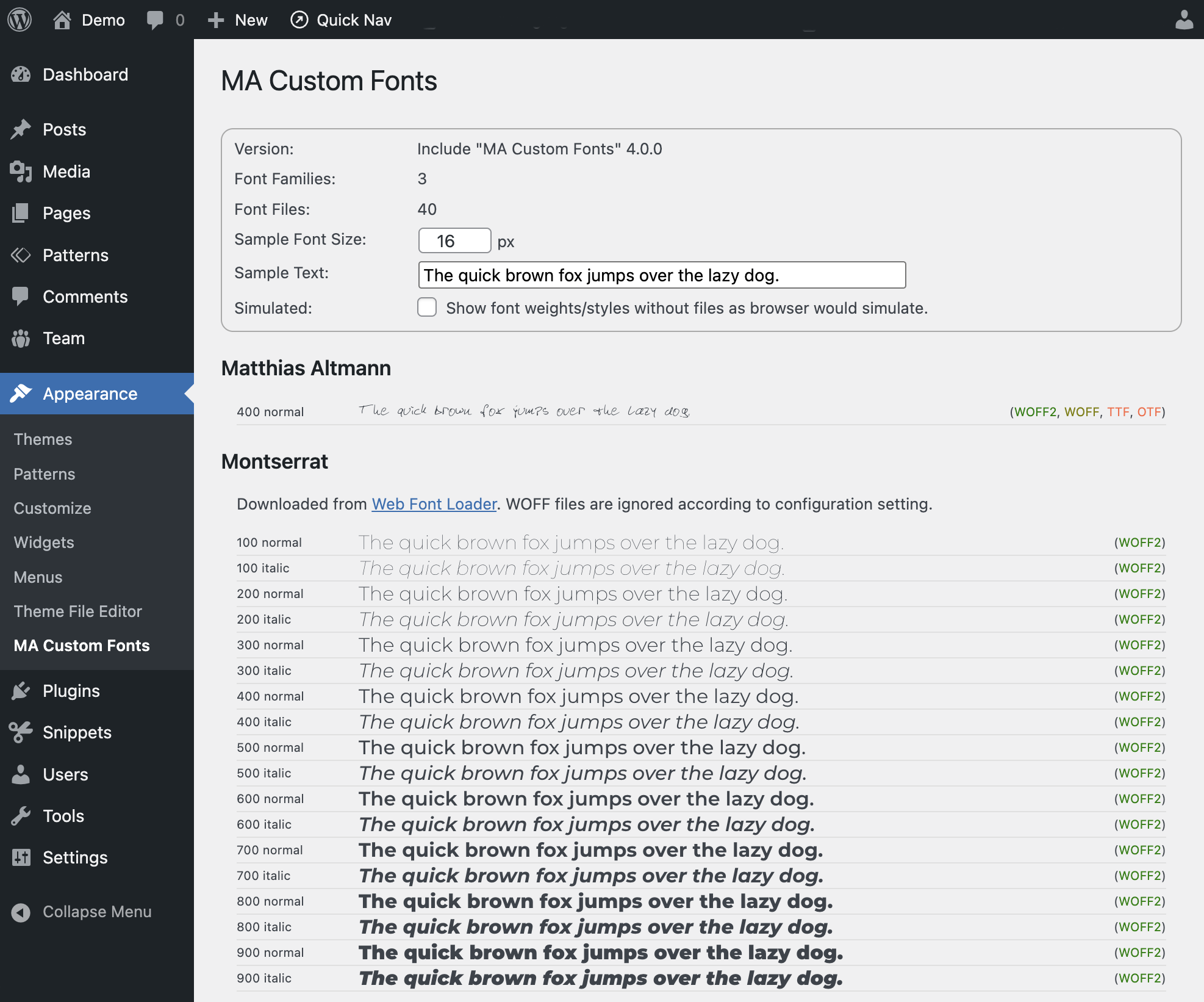
MA Custom Fonts includes a test feature that displays a list of all recognized and registered font families, weights, and styles. Here, you can check how the fonts are integrated and rendered, including at different font sizes.
Test with Admin Function
In the WordPress administration there is a new menu item “MA Custom Fonts” under Appearance
Here you get a quick overview of the fonts registered by MA Custom Fonts.
Test by Shortcode
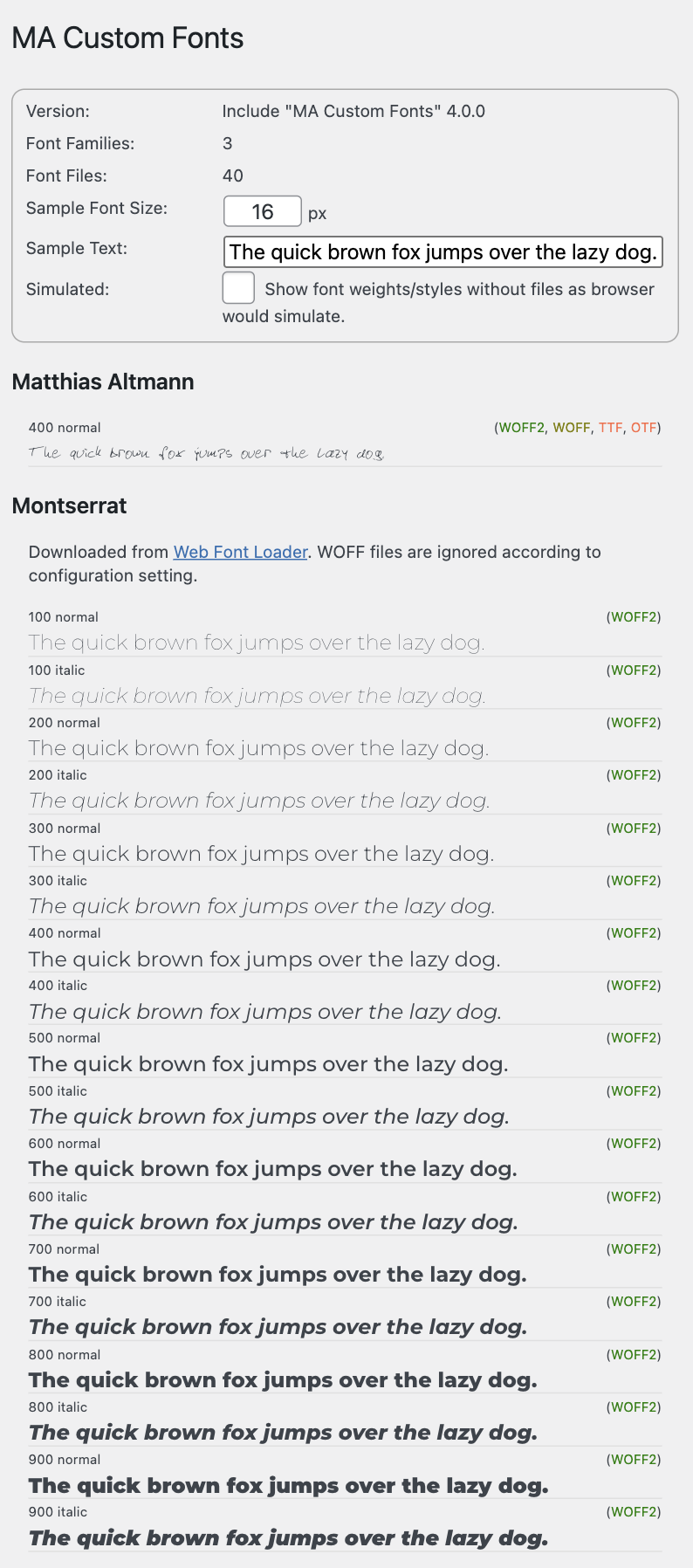
MA Custom Fonts provides a shortcode [ma-customfonts-test].
This shortcode can be easily entered on a new page in the Gutenberg Editor. With the shortcode placed on a page you can easily test the fonts e.g. on a smartphone.
Performance
During development, I placed a strong emphasis on efficiency and performance. Detecting existing fonts and generating the CSS code takes only milliseconds on an average server.
The CSS code for the fonts is linked as a CSS file or, alternatively, embedded at the bottom of each page, no matter if one of the fonts is used on that page or not.
However, the browser loads a font only when it is really needed, and then only in the one preferred format.
Compatibility
Oxygen (Classic)
So far, I know of some WordPress plugins that integrate custom fonts into Oxygen (Classic) in a similar way: “Core Framework” *, “Elegant Custom Fonts”, “Oxy Font Manager”, “Swiss Knife”, “Use Any Font”.
Since the way of implementation or the technical approach to integrate fonts into Oxygen are similar in these plugins and MA Custom Fonts, these solutions are not compatible. You have to choose one of these solutions. So please deactivate these plugins, or in case of “Swiss Knife”, deactivate the “Font Manager” before using MA Custom Fonts.
*) In Core Framework version 1.9.3 and higher, “Fonts Integration” can be disabled, which allows MA Custom Fonts to be used again.
Oxygen offers the possibility to embed Google Fonts directly.
If you want to use MA Custom Fonts to host Google Fonts locally on your own server, I recommend disabling Google Fonts support in Oxygen: Oxygen > Settings > Bloat Eliminator > Disable Google Fonts
Bricks
I am not aware of any incompatibilities with Bricks.
Bricks offers the possibility to embed Google Fonts directly.
If you want to use MA Custom Fonts to host Google Fonts locally on your own server, I recommend disabling Google Fonts support in Bricks: Bricks > Settings > Performance > Disable Google Fonts
FAQ – Frequently Asked Questions
Since the 1990s, the “True Type” format (TTF) has been available for installing fonts on a computer.
Starting in the 2010s, other increasingly optimized font file formats were developed for use on the web, namely OTF, WOFF, and WOFF2.
WOFF2 is currently the most advanced format and is supported by all modern browsers.
Only a few older devices, such as iPhones and iPads of the very early generations, cannot use it and need WOFF.
The following table shows the file sizes of the individual file formats using the “Dinot” font:
| Format | File Size |
|---|---|
| TTF | 52 KB |
| OTF | 44 KB |
| WOFF | 24 KB |
| WOFF2 | 16 KB |
Since a font can consist of several files for the different weights and styles, it quickly becomes clear that with modern formats such as WOFF and WOFF2, significantly less data needs to be transferred.
So if you have your own font only in TTF format, it is recommended to convert it to WOFF or WOFF2.
You can find numerous free online services for this on the Internet under the search term “Font Converter”.
Yes.
For downloading Google Fonts in modern web formats, I have developed my own service Web Font Loader, which is perfectly adapted for use with MA Custom Fonts.
Please note: (Oxygen)
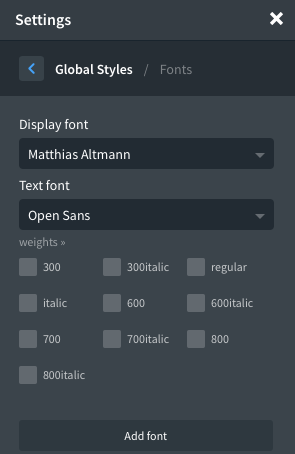
MA Custom Fonts will search for font files and add them to the Oxygen font list.
However, Oxygen offers some Google Fonts in the font list by itself.
For example, if we download the Google Font “Roboto” and host it locally, MA Custom Fonts will add it to the font list.
Oxygen adds the Google Font “Roboto” itself.
So “Roboto” is now included twice in the list: Once as local font (listed in light blue) and once as Google Font (listed in white).
To make matters worse, even with the option “Disable Google Fonts” enabled, Oxygen still displays 20 Google fonts in the font selector, and offers Google Fonts when searching for fonts. This is known to the Oxygen team, but there is currently no solution for this.
I recommend disabling support for Google Fonts in Oxygen: Oxygen > Settings > Bloat Eliminator > Disable Google Fonts
In Oxygen Global Settings you can define the font weights for Google Fonts to be embedded. This way you can limit which font weights are loaded from Google Fonts Server and thus reduce the file size if only a few font weights are used.
For custom fonts embedded via MA Custom Fonts, all font files are already available on your own server. Typically, there is a separate font file for each weight within a font family. All of these font files, and thus the various weights, are made available to the browser. However, the browser only loads the font files with the weights that are actually needed to display the page.
So there is no reason to limit the font sizes for our own fonts in the Oxygen Global Settings.
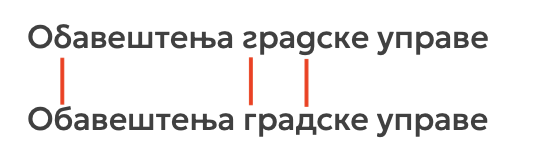
In some cases, Cyrillic characters may not be displayed correctly in certain languages with certain fonts. The following CSS rule solves this problem:
* {
  -webkit-font-feature-settings: "locl" 0;
  -moz-font-feature-settings:    "locl" 0;
  -ms-font-feature-settings:     "locl" 0;
  font-feature-settings:         "locl" 0;
  -webkit-locale: auto;
}
Software Installation and Updates
Installation
The software can be installed using various methods:
Plugin:
The software is available as a plugin (ZIP archive) and can be installed in WordPress as a plugin.
Code Snippet:
The software can be run as a code snippet.
For the “Code Snippets” and “Advanced Scripts” plugins, a JSON file is available for download that can be directly imported there.
PHP:
The software can be downloaded as a PHP file.
This PHP file can be used in other code snippet plugins (copy & paste the code) or be included in your own WordPress child theme (require_once('path/to/the.php');).
Updates
The software automatically checks for available updates:
Plugin:
The update process follows standard WordPress methods: It checks for a new version every 12 hours.
The update can then be performed manually or automatically.

Code Snippet & PHP:
The software implements a special method that checks for updates even when installed as a snippet or PHP include. As with plugins, the check interval is set to 12 hours.
If a newer version is available, a notification will be shown in the admin area.

Download
Donation ❤️
I enjoy developing software and solving typical requirements with them.
The software is provided for free use.
If you like, you can honor my many hours of work with a small coffee donation via PayPal.
When clicking the button, a connection to PayPal is established.
Your donation will, of course, be taxed properly by me.
Disclaimer
I have developed and tested this software to the best of my knowledge.
I provide the software for free use.
I cannot give any guarantee for the functionality because of the countless possible variations in WordPress environments.
Download and use this software at your own risk and responsibility.
Change Log
- Version 4.0.5July 5, 2026Requires At Least WordPress: 6.1•Tested Up To WordPress: 7.0•Requires PHP: 8.0
Fixes:
- An incorrect path was displayed in error messages related to the fonts base folder.
- Now using
wp_is_writable()instead ofis_writable()for the writable test on the fonts base folder,
because PHP's original function may fail on Windows servers - Added additional check to ensure the relative font URL always starts with a slash.
(Thanks to Julian D. for analysis, reporting, solution suggestions for all three issues)
- Version 4.0.4July 3, 2026Requires At Least WordPress: 6.1•Tested Up To WordPress: 7.0•Requires PHP: 8.0
Fixes:
- For custom fonts, the style detection from filename might have accidentally detected parts of the font name
as weight keywords.
Sample: RobotoSemiCondensed-100 was wrongly detected as weight 600 because of the keyword "semi".
Fixed by changing the regex to respect word boundaries.
(Thanks to Ves Rumyantsau for analysis, reporting, solution suggestion) - A Web Font Loader json file misplaced in the root font folder might have caused custom fonts to be ignored.
Changes
- Renamed Plugin title from "MA CustomFonts" to "MA Custom Fonts" to match all other references.
Tested:
- Bricks 2.3.8
- For custom fonts, the style detection from filename might have accidentally detected parts of the font name
- Version 4.0.3Download not available.June 13, 2026Requires At Least WordPress: 6.1•Tested Up To WordPress: 7.0•Requires PHP: 8.0
Fixes:
- Setting "CSS Font URLs" (relative/full/schemeless) was ignored due to order of initialization.
(Thanks to Albert Calzada for reporting)
Changes:
- Settings: Auto-sizing for input fields, theme color for toggles
- Font Samples: Auto-sizing for input field, improved responsive layout
Tested:
- Bricks 2.3.7
- Setting "CSS Font URLs" (relative/full/schemeless) was ignored due to order of initialization.
- Version 4.0.2Download not available.May 21, 2026Requires At Least WordPress: 6.1•Tested Up To WordPress: 7.0•Requires PHP: 8.0
Changes:
- Moved plugin updater methods to separate class to reduce code snippet size.
Tested:
- WordPress 7.0
- Version 4.0.1Download not available.May 15, 2026Requires At Least WordPress: 6.1•Tested Up To WordPress: 6.9.4•Requires PHP: 8.0
Fixes:
- When using a combination of custom fonts and font packages from Web Font Loader, the custom fonts may not
have been properly recognized. - Font Manager: Viewer info was displayed with escaped html, crippling the link to Web Font Loader for WFL.
- Fixed PLUGIN URI for "Visit plugin site" link
Tested:
- PHP 8.5
- Bricks 2.3.5
Minimum requirements:
- PHP 8.0
- WordPress 6.1
- When using a combination of custom fonts and font packages from Web Font Loader, the custom fonts may not
- Version 4.0.0Download not available.May 10, 2026Requires At Least WordPress: 5.8•Tested Up To WordPress: 6.9.4•Requires PHP: 7.4
New Features:
- Now available as Code Snippet, Include, and Plugin with automatic update check.
For snippet or include, checks for updates every 12 hrs (same frequency used by WP for plugin updates),
and shows update notice in admin area, dismissible for 12 hrs. Can also be checked manually on the Settings page.
For plugin, WordPress standard update mechanism is used. - Settings > MA Custom Fonts
- Configure all settings for the font integration.
- If settings have changed, the CSS file will be regenerated automatically.
- Appearance > Font Manager ** EXPERIMENTAL BETA
- Brand new UI for managing folders and files in the /wp-content/uploads/fonts folder.
- Only available in the Plugin version.
Changes:
- Removed support of obsolete font formats EOT and SVG, that are not supported by any browser since 2013/2018.
Fixes:
- Nested folder structures could result in falsely detecting a font as part of a WFL package
- Font sample page order of font formats was not according to prioritized order.
- Now available as Code Snippet, Include, and Plugin with automatic update check.
- Version 3.4.5Download not available.January 19, 2026Requires At Least WordPress: 5.8•Tested Up To WordPress: 6.9•Requires PHP: 7.4
Compatibility:
- Core Framework 1.9.3 added a toggle "Disable Fonts Integration".
Disabling Fonts Integration allows the use of MA Custom Fonts with Oxygen Builder.
(Thanks to Luke Allen from the Core Framework dev team for adding this toggle and providing a related compatibility check code sample.)
- Core Framework 1.9.3 added a toggle "Disable Fonts Integration".
- Version 3.4.4Download not available.August 29, 2025
Fixes:
- Fixed font base URL for WP setup in subdirectory
(Thanks to Salomon van Riesen and Chanan Strauss for reporting)
- Fixed font base URL for WP setup in subdirectory
- Version 3.4.3Download not available.June 8, 2025
New Feature Preview:
- Initial inofficial support for WordPress FSE Site Editor (Full Site Editing) themes.
Custom fonts are now available in the Site Editor, too.
The custom fonts are listed in the "Typography" section of the "Styles" panel.
Changes:
- Font URL pattern in
ma-customfonts.csscan now be configured to use'relative','full'or'scheme-less'URLs. Default is 'relative'.
This improves compatibility with CDNs, 3rd party CSS optimizers/minimizers, and some polyfills. - Implemented QueryMonitor timing
- Added "Core Framework" to incompatibilities if installed together with Oxygen Builder
- Initial inofficial support for WordPress FSE Site Editor (Full Site Editing) themes.
- Version 3.4.2Download not available.March 15, 2024
Fixes:
- Fixed PHP warning in
admin_init()line 818:$_REQUEST['page']might not be defined when using Bricks.
- Fixed PHP warning in
- Version 3.4.1Download not available.March 4, 2024
Changes:
- Builder fonts in Gutenberg: Call of Oxygen function
ct_get_global_settingsembedded incall_user_func()to avoid being marked as unknown in Bricks setups.
Fixes:
- Fixed PHP warning in
admin_init(): Variable$builder_fonts_to_gutenbergdefinition was inside of Oxygen block, hence undefined in Bricks block.
- Builder fonts in Gutenberg: Call of Oxygen function
- Version 3.4.0Download not available.February 25, 2024
Reorganization of code base.
New Features:
- Support for assigning fonts in Gutenberg.
Can be disabled by setting$gutenberg_font_family_select = false; - Oxygen Builder: Hide "Top 20" Google Fonts if Google Fonts are disabled.
- Added filter for excluding ma-customfonts.css from FlyingPress CSS minimizer which causes issues with already minimized CSS containing
@font-facerules.
Changes:
- Changed CSS file name from
ma_customfonts.csstoma-customfonts.css - Changed test page slug from
ma_customfontstoma-customfonts - Removed setting
$recursivefor font file scan. Always scan recursive. - Added compatibility check for "Oxy Font Manager"
- Oxygen Builder font lists now show "Custom" badge for injected fonts
- Custom Fonts Test now loads CSS using URL parameter
ver=to ensure proper refresh. - Setting
$fonts_in_gutenbergchanged to$builder_fonts_in_gutenberg(Bricks, Oxygen) - Setting renamed:
$cssoutputto $css_output,$cssminimizeto $css_minimize,$fontdisplayto$font_display $timingnow allows levels 0/false (off), 1/true (basic), 2 (extended)$timingnow also calculates memory usage. Please note that memory usage won't simply be cummulated. Methods use memory temporarily but also free memory after use.
- Support for assigning fonts in Gutenberg.
- Version 3.3.1Download not available.October 17, 2022
Changes:
- Migrated JavaScript from jQuery to vanilla JS (ES6) to eliminate jQuery dependency.
- Modernized initialization to avoid errors with WPCodeBox:
Replaced @ error control operator with ?? null coalescing operator
(Thanks to Alexander van Aken for reporting)
- Version 3.3.0Download not available.September 26, 2022
New Features:
- Custom Fonts are now also available in Bricks Builder. They are listed in section "Standard Fonts".
(Thanks to Luke Wakefield for the implementation idea and to Tom Homer for contacting and informing me about Luke's solution) - New configuration option
$fonts_in_gutenberg:
Allows to enable (default) or disable the assignment of custom fonts in Gutenberg.
Changes:
- Renamed code snippet from "MA Oxygen Custom Fonts" to "MA Custom Fonts"
Fixes:
- The snippet applies display and text fonts defined in Oxygen to Gutenberg Editor.
Google fonts defined in Oxygen are not loaded for Gutenberg.
So we can't assign Google fonts to Gutenberg. Only custom fonts are now assigned.
(Thanks to Kamil Alhaijali for reporting)
- Custom Fonts are now also available in Bricks Builder. They are listed in section "Standard Fonts".
- Version 3.2.7Download not available.September 19, 2022
Compatibility Fix:
- In Oxygen 4.0.4, Pro Menu calls
ECF_Plugin::get_font_families()as Ajax call.
For performance reasons, MA Custom Fonts doesn't get initialized for Ajax calls and doesn't have the base font directory set, which causes an error.
We now just return an empty custom fonts list to prevent this error. That doesn't impact the Pro Menu functionality.
(Many thanks to Kevin Pudlo from the Oxygen development team for reporting, support and testing concerning the Pro Menu component, and Alexander van Aken for reporting a similar issue concerning the Mega Menu component.)
- In Oxygen 4.0.4, Pro Menu calls
- Version 3.2.6Download not available.June 2, 2022
New Features:
- New configuration option
$wfl_support_woff:
Font packages downloaded from Web Font Loader (https://webfontloader.altmann.de/) contain WOFF2 files supported by all modern browsers, and also WOFF files to support ancient browsers before 2016 like Internet Explorer, or Safari on older Apple devices.
The new default setting is to NOT provide old style WOFF files for ancient browsers.
Set this option totrueif you still need to support old browsers before 2016.
(Many thanks to Sunny Trochaniak and Yan Kiara for reporting issues and supporting investigations with unexpected WOFF loading when using symbols/emoji) - Added display of timing details at end of page Appearance > MA Custom Fonts
Fixes:
- Corrected initialization of dummy ECF plugin to let Oxygen detect custom fonts and prevents attempts to be loaded as Google fonts
(Thanks to Firat Sekerli for reporting)
Changes:
- Removed configuration and all code for debugging.
- For Web Font Loader fonts: Only emit CSS if related font file exists.
User might have deleted e.g. the files for a specific language.
- New configuration option
- Version 3.2.5Download not available.March 25, 2022
New Features:
- Legend and coloring for font formats in custom fonts test screen
Changes:
- Renamed Admin menu Appearance > "Custom Fonts" to "MA Custom Fonts"
- Renamed test shortcode from "
maltmann_custom_fonts_test" to "ma-customfonts-test" - Optimized handling of font_base (dir, url) by class var
- Enhanced detection of variable weight fonts by
[wght]in filename
(Thanks to Paul Batey for reporting) - Adapted min/max font weight for variable fonts from 100/900 to 1/1000 according to https://developer.mozilla.org/en-US/docs/Web/CSS/@font-face/font-weight#values
(Thanks to Paul Batey for reporting) - Completely re-built custom font test screen (WP Admin and Shortcode) to improve
- variable weight fonts (display logic)
- responsive view (for test on smartsphones)
- VersionDownload not available.February 11, 2022
Tested with PHP 8.0, WordPress 5.9, Oxygen 4.0 beta 1
- Version 3.2.4Download not available.October 26, 2021
Changes:
- Deferred initialization to hook
wp_loaded, after incompatibility checks - Gutenberg: Apply custom fonts for new posts also
- Renamed IDs (for scripts and styles) and CSS classes (for font test) for consistency
Performance:
- Avoid unneccessary init by separating admin/frontend and more detailed checks
Fixes:
- Fixed an issue comparing hashes for code and file
(Thanks to David Sitniansky for reporting) - Emit styles for Gutenberg correctly if
$cssoutputis configured as'html'
- Deferred initialization to hook
- Version 3.2.3Download not available.October 15, 2021
Changes:
- Gutenberg: Use display font for post title
(Thanks to Sunny Trochaniak for reporting) - Fonts preview: Changed sample text size from 15 to 16 px which is browser standard
- Fonts preview: Shortcode output uses WP system fonts for UI instead of custom fonts
- CSS file link now contains
?ver=...instead of?hashonly
Performance:
- Only create CSS file if contents (font configuration) have changed
Fixes:
- Removed
itemprop="stylesheet"from<link rel="stylesheet" ...>
(Thanks to Max Gottschalk for reporting and testing) - Proper quoting for font families
- Gutenberg: Use display font for post title
- Version 3.2.2Download not available.August 2, 2021
Changes:
- Using scheme-less URL to avoid issues with wrong WordPress URL configuration
- Added admin notice if folder
wp-content/uploads/fontsis not writable.
Fixes:
- Fixed issue with uppercase font file extensions.
- Version 3.2.1Download not available.June 18, 2021
Fixes:
- Fixed typo in CSS for Gutenberg
- Version 3.2.0Download not available.June 18, 2021
New Features:
- Display Custom Fonts in Gutenberg (enqueue
ma_customfonts.cssfor font definitions, add custom style for display and text font from Oxygen global settings)
Changes:
- Auto-create folder
/wp-content/uploads/fonts
- Display Custom Fonts in Gutenberg (enqueue
- Version 3.1.3Download not available.May 17, 2021
Changes:
- Optimized init sequence
- Emit implementation and version in CSS
- Reversed Version History order
- Version 3.1.2Download not available.May 16, 2021
Changes:
- Avoid font swap: Load
ma-customfonts.cssearly; default font-display now "block"
New Features:
- Allow space in addition to dashes to detect font weights and styles
(Thanks to Henning Wechsler for reporting)
- Avoid font swap: Load
- Version 3.1.1Download not available.March 21, 2021
Fixes:
- Fixed font loading in Gutenberg editor (with Oxygen Gutenberg Integration)
- Version 3.1.0Download not available.March 20, 2021
New Features:
- "Oblique" in font file name is now detected as italic style
- Custom Fonts test: Option to show font weights/styles without files as browser would simulate.
Changes:
- Output Custom Font CSS in head instead of footer to prevent font swap
- Custom Fonts test: Changed logic for output font samples and related file info
Fixes:
- Custom Fonts test: Fixed font file count for fonts provided by Web Font Loader
- Version 3.0.2Download not available.March 8, 2021
Fix:
- Compatibility with Windows server and local dev environments.
(Thanks to Franz Müller for reporting and testing)
- Compatibility with Windows server and local dev environments.
- Version 3.0.1Download not available.February 23, 2021
Fixes:
- Compatibility with WordPress 5.6.2 (doesn't set
REQUEST::actionanymore) - Compatibility check with Swiss Knife's Font Manager feature
- Compatibility with Swiss Knife (font lists did not display custom fonts light blue)
- Compatibility with WordPress 5.6.2 (doesn't set
- Version 3.0.0Download not available.February 18, 2021
New Features:
- Support for font packages from Web Font Loader (https://webfontloader.altmann.de/)
- New configuration option: CSS output as inline CSS or external CSS file (cacheable)
- New configuration option: CSS minimize (was controlled by debug switch before)
- Changed configuration option:
font-displaymay now be specified as desired, default is now 'auto'
- Version 2.5.2Download not available.January 24, 2021
New Features:
- Custom Fonts test (via Admin panel and shortcode) now allows custom sample text
- Version 2.5.1Download not available.January 23, 2021
Fix:
- Changed compatibility check process:
Changed Hook for plugin compatibility check fromplugins_loadedtoinit
Check only if admin and functionis_plugin_activeexists
(Thanks to Sebastian Albert for reporting and testing)
- Changed compatibility check process:
- Version 2.5.0Download not available.January 23, 2021
New features:
- WP Admin Menu: Appearance > Custom Fonts
Shows a list of all registered custom fonts, including samples, weights, formats with adaptable sample font size - Detect font weight terms "Book" (400) and "Demi" (600)
Changes:
- Redesign of classes (MA_CustomFonts, ECF_Plugin)
- Font swap is now a configuration option
- Cut "-webfont" from font name
- WP Admin Menu: Appearance > Custom Fonts
- Version 2.2.5Download not available.December 8, 2020
Changes:
- In CSS, font sources are now listed in a prioritized order (eot,woff2,woff,ttf,otf,svg)
(Thanks to Viorel Cosmin Miron for reporting) - Test shortcode now also displays available font formats
- In CSS, font sources are now listed in a prioritized order (eot,woff2,woff,ttf,otf,svg)
- Version 2.2.4Download not available.November 27, 2020
Fix:
- Corrected typo in variable name (2 occurrences) that could cause repeated search for font files.
(Thanks to Viorel Cosmin Miron for reporting)
- Corrected typo in variable name (2 occurrences) that could cause repeated search for font files.
- Version 2.2.3Download not available.November 25, 2020
Changes:
- In Oxygen font selectors the custom fonts are now displayed in lightblue to distinguish from default, websafe and Google Fonts
- Version 2.2.2Download not available.November 25, 2020
New features:
- Partial support for fonts with variable weights, detected by "VariableFont" in filename. CSS output as
font-weight:100 900;
- Partial support for fonts with variable weights, detected by "VariableFont" in filename. CSS output as
- Version 2.2.1Download not available.November 24, 2020
New features:
- Shortcode
[ maltmann_custom_font_test ]for listing all custom fonts with their weights and styles
Changes:
- Fonts are now sorted alphabetically for e.g. CSS output
- Added more request rules to skipping code execution when not needed
- Shortcode
- Version 2.2.0Download not available.November 23, 2020
New features:
- Detection of font weight from number values
- CSS now contains
font-display:swap;
- Version 2.1.1Download not available.October 3, 2020
Fix:
- Handle empty fonts folder correctly.
(Thanks to Mario Peischl for reporting) - Corrected title and file name (typo "cutsom") of Code Snippet
- Handle empty fonts folder correctly.
- Version 2.1.0Download not available.September 16, 2020
New features:
- Detection of font weight and style from file name
Fixes:
- EOT: Typo in extension detection
- EOT: Missing quote in style output
- Version 2.0.0Download not available.September 15, 2020
Improved version
- Finds all font files (eot, otf, svg, ttf, woff, woff2) in directory
wp-content/uploads/fonts/ - Optionally recursive
- Takes font name from file name
- Emits optimized CSS with alternative font formats
- Special handling for EOT for Internet Explorer
- Finds all font files (eot, otf, svg, ttf, woff, woff2) in directory
- Version 1.0.0Download not available.April 10, 2020
Initial version for client project