
Introduction
When creating and maintaining websites with WordPress, you regularly have to switch back and forth between the content types (pages, posts, custom posts). In the normal WordPress admin navigation, you first jump to the list, wait until the list is displayed and then click on the desired entry for editing.
Switching between different content requires a few clicks and also time.
Solution
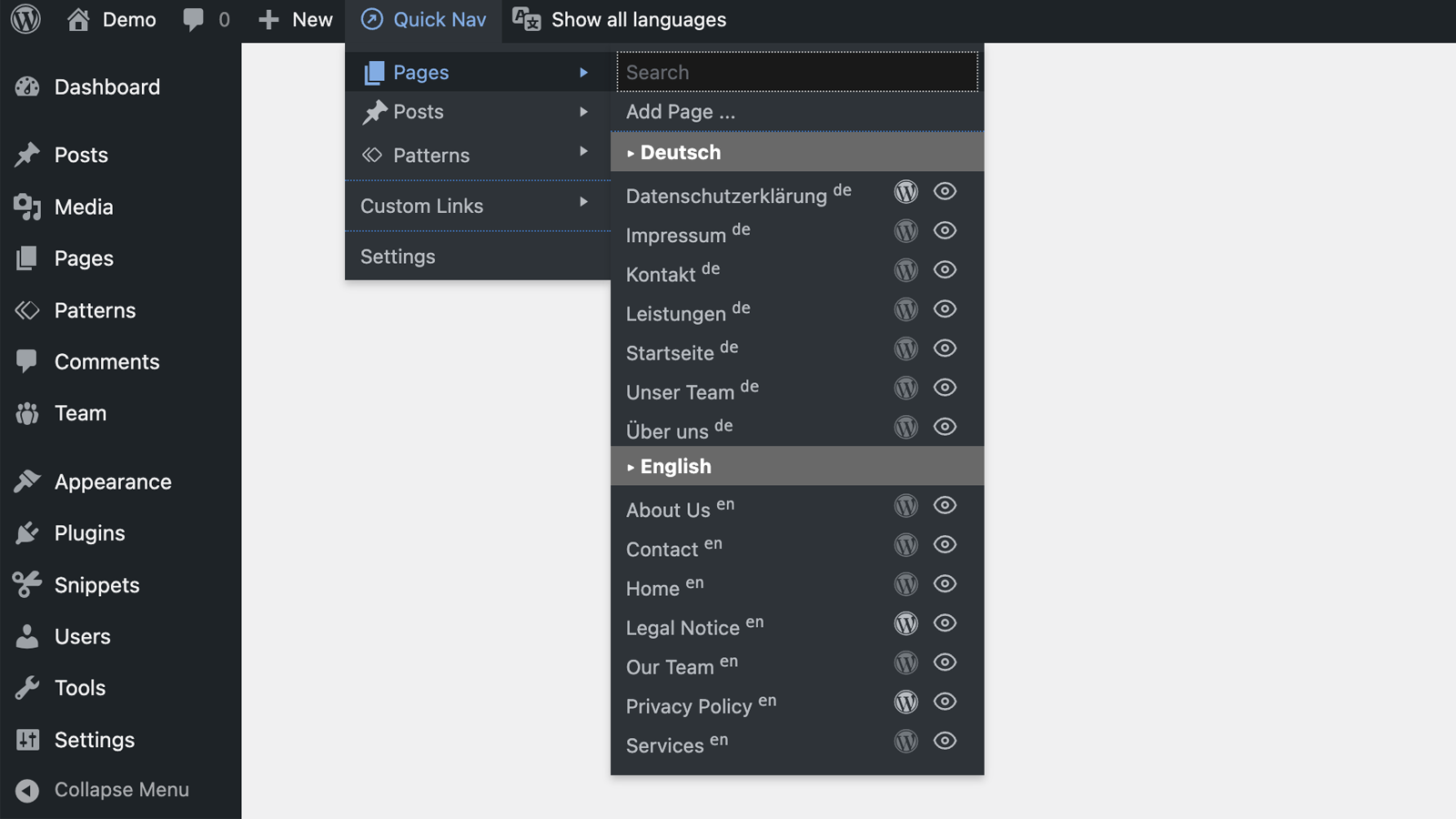
MA Admin Quick Nav provides a quick navigation in the top admin bar.
The navigation is highly customizable, supports the WordPress standard content types “Posts” and “Pages” as well as your own content types (custom posts), and also offers extended functionality for the Bricks and Oxygen (Classic) builders.
Settings
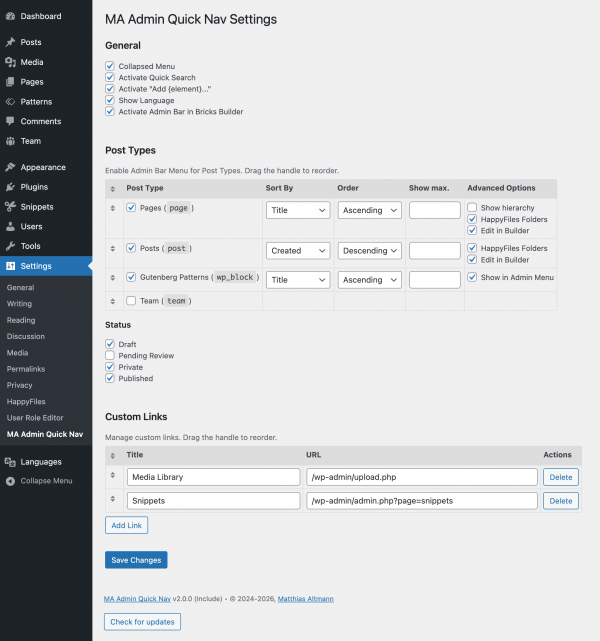
The configuration can be reached via Settings > Quick Nav.
General Settings
Collapse menus
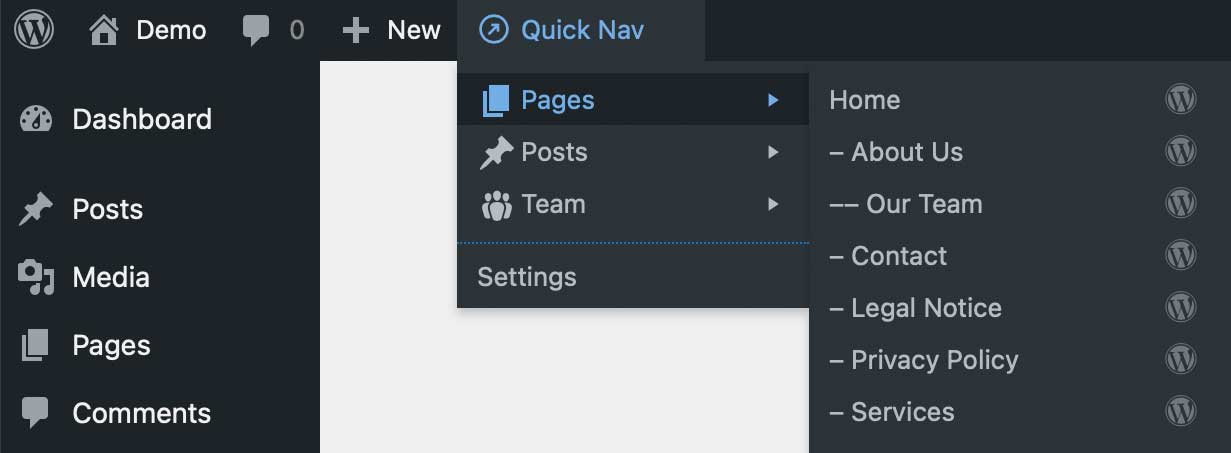
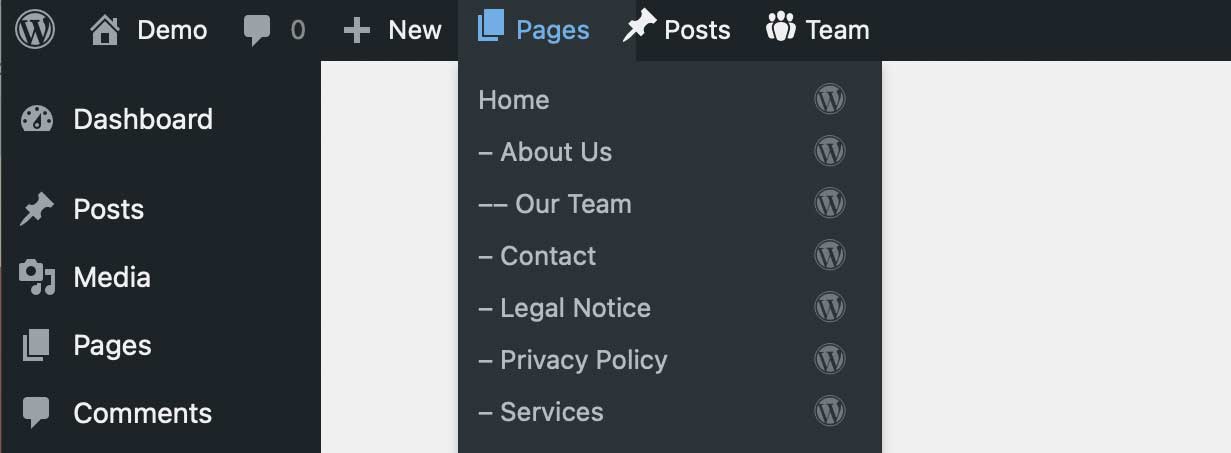
The “Collapsed Menu” setting determines whether the post types are displayed next to each other in the menu bar or combined in a common “Quick Nav” menu.
Here is the comparison between the setting variants:
Quick Search
The setting “Activate Quick Search” is used to activate the quick search.
An input field is offered above each list of content types, which filters the displayed entries when text is entered.
This is particularly helpful when the list of posts is long and the configured sorting makes it difficult to find the entry you are looking for.
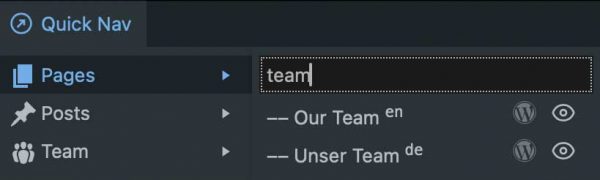
The search is not case-sensitive.
The search also takes into account the language indicator and the status, if these are displayed.
Note:
The quick search filters the displayed entries. If the number of entries displayed for this post type is limited via the settings, the quick search will only filter the entries that are currently displayed.
Add new
The setting “Activate Add Item” adds a link to the lists for creating a new entry of the respective content type.
Polylang: Show Language
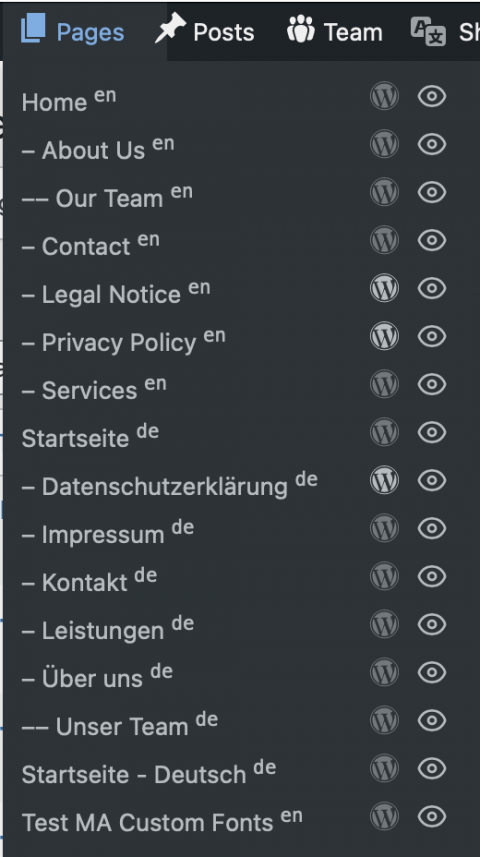
If you have Polylang installed, the setting “Show language in item lists” will display the item language in the lists.
Polylang: Edit in other language
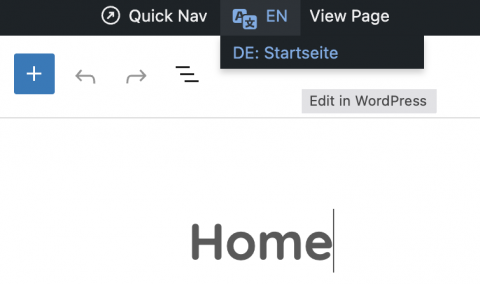
If an element (post, page, template) is also available in other Polylang translations, a new menu can be displayed in the editor (Classic, Gutenberg, Bricks, Oxygen) to quickly switch to the other languages. The current element will then open in the selected language in the editor you are currently using.
Admin Bar in Builder
If you have Bricks or Oxygen installed, this setting defines if the WordPress Admin Bar should also be shown in the builder.
Post Types
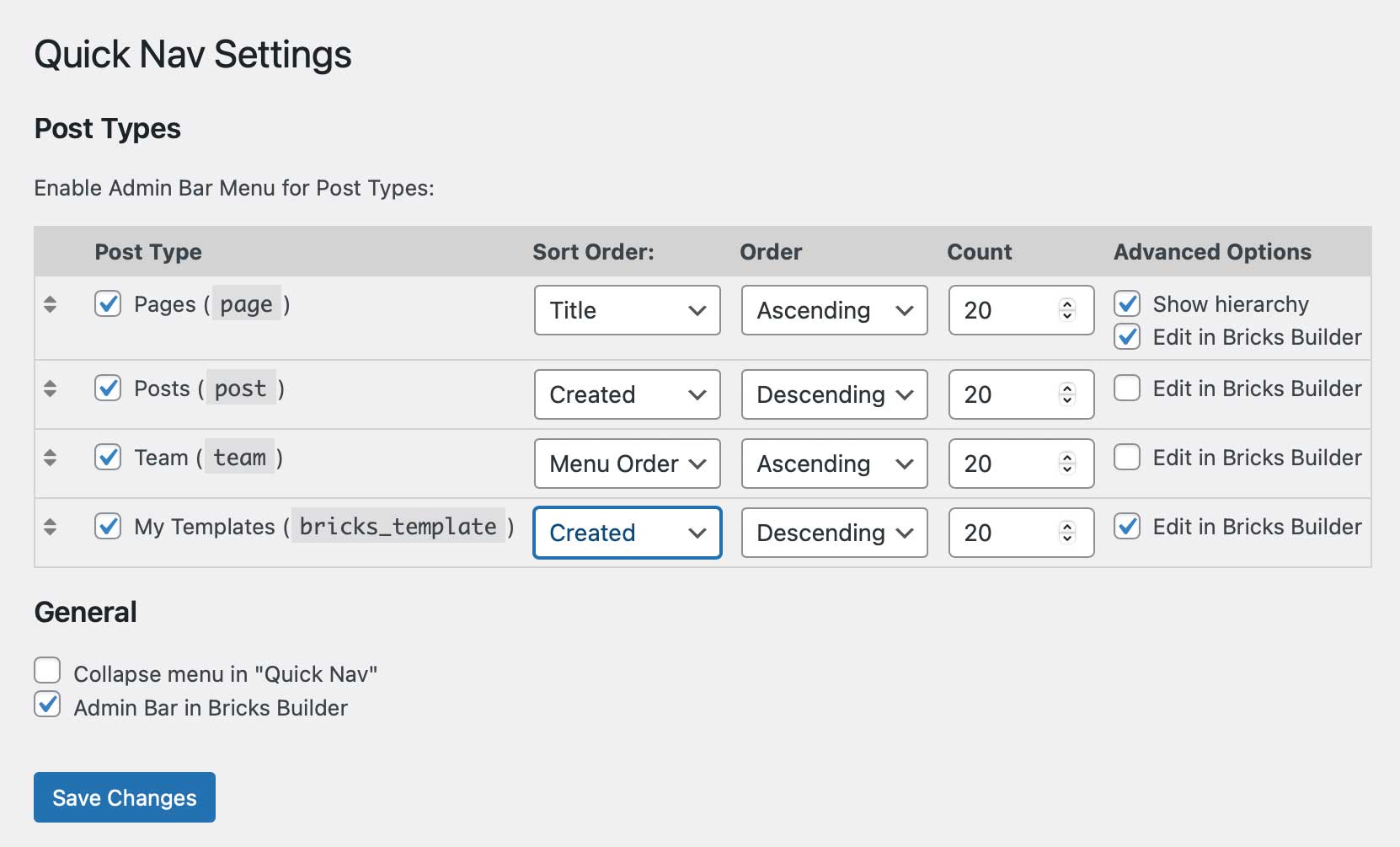
The Settings page lists all post types that also appear in the left-hand admin menu.
The post types can be selected individually to be displayed in the quick navigation.
Change the order of the post types
The icon  is used to drag and drop the post types into the desired order.
Simply hold the icon with the mouse and drag it to the desired position in the list.
Change the order of the list entries
The “Sort Order” and “Order” selection lists allow you to specify the desired sorting for the entries in the quick navigation. They can be sorted by title, creation date or the order defined in the content type itself, in ascending or descending order.
Limit
The “Limit” setting can be used to limit the number of entries displayed in the quick navigation.
An empty field allows all entries in the system to be listed. A set value limits the number of entries listed in relation to the currently selected sorting.
Hierarchical representation
Some post types, such as “Pages”, allow you to define a hierarchy.
With the “Show hierarchy” option, the entries in the quick navigation are displayed indented according to their hierarchy level.
HappyFiles Folders
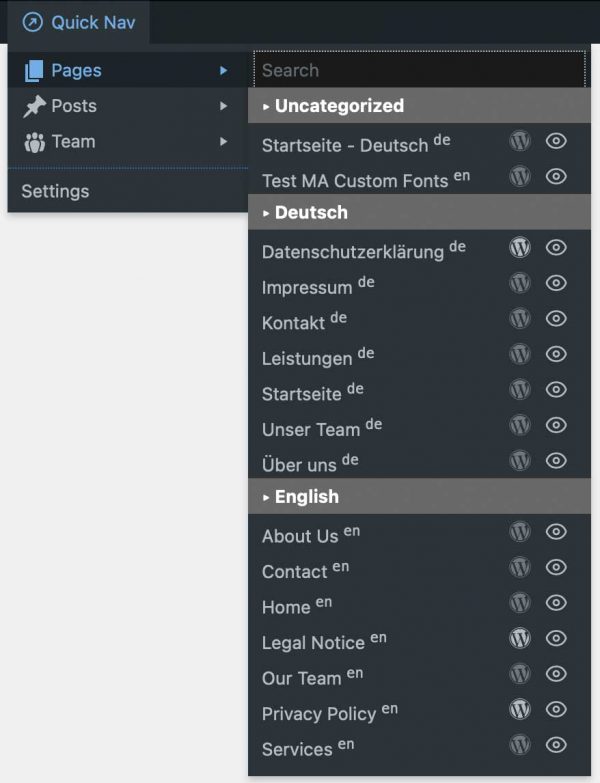
If you have installed the plugin HappyFiles to organise your content types, you can use the setting “HappyFiles Folders” to display these organisational folders also in the quick navigation lists.
This setting is available for content types that have been activated in the HappyFiles settings.
The combination “HappyFiles Folders” and “Show hierarchy” is currently not reliably supported.
.
Status
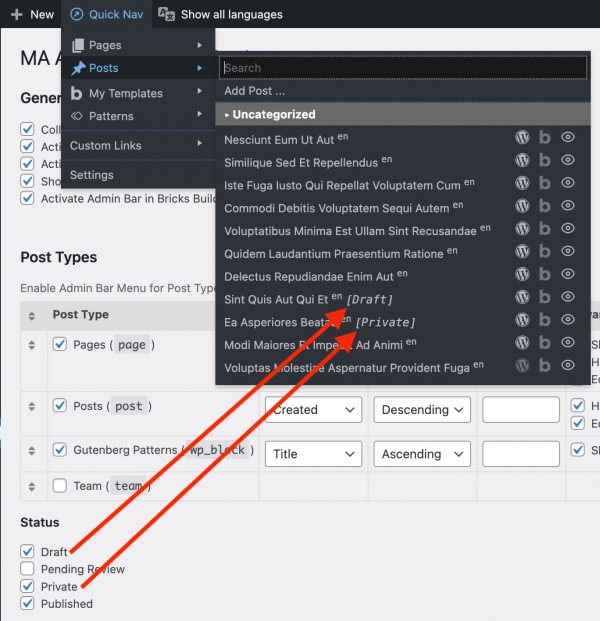
By default, only content with the status “Published” is listed in the navigation.
You can specify here whether content with the status “Draft”, “Pending” and “Private” should also be displayed.
These entries are marked accordingly in the lists.
Custom Links
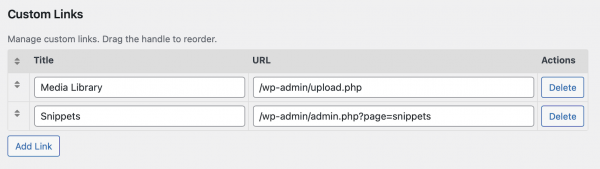
In this section, you can add any additional links.
This allows quick access to frequently used functions.
For each link, the title and URL are specified.
Change the order of the custom links
The icon is used to drag and drop the post types into the desired order.
Simply hold the icon with the mouse and drag it to the desired position in the list.
Display in the menu
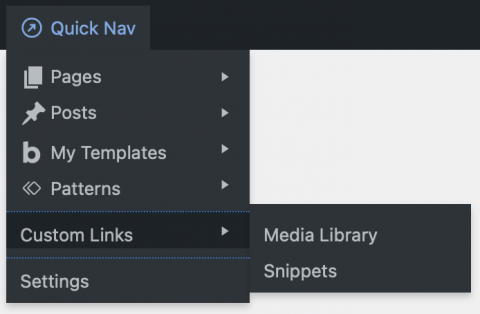
The links are displayed in a separate section in the Quick Nav menu.
Support for Bricks and Oxygen
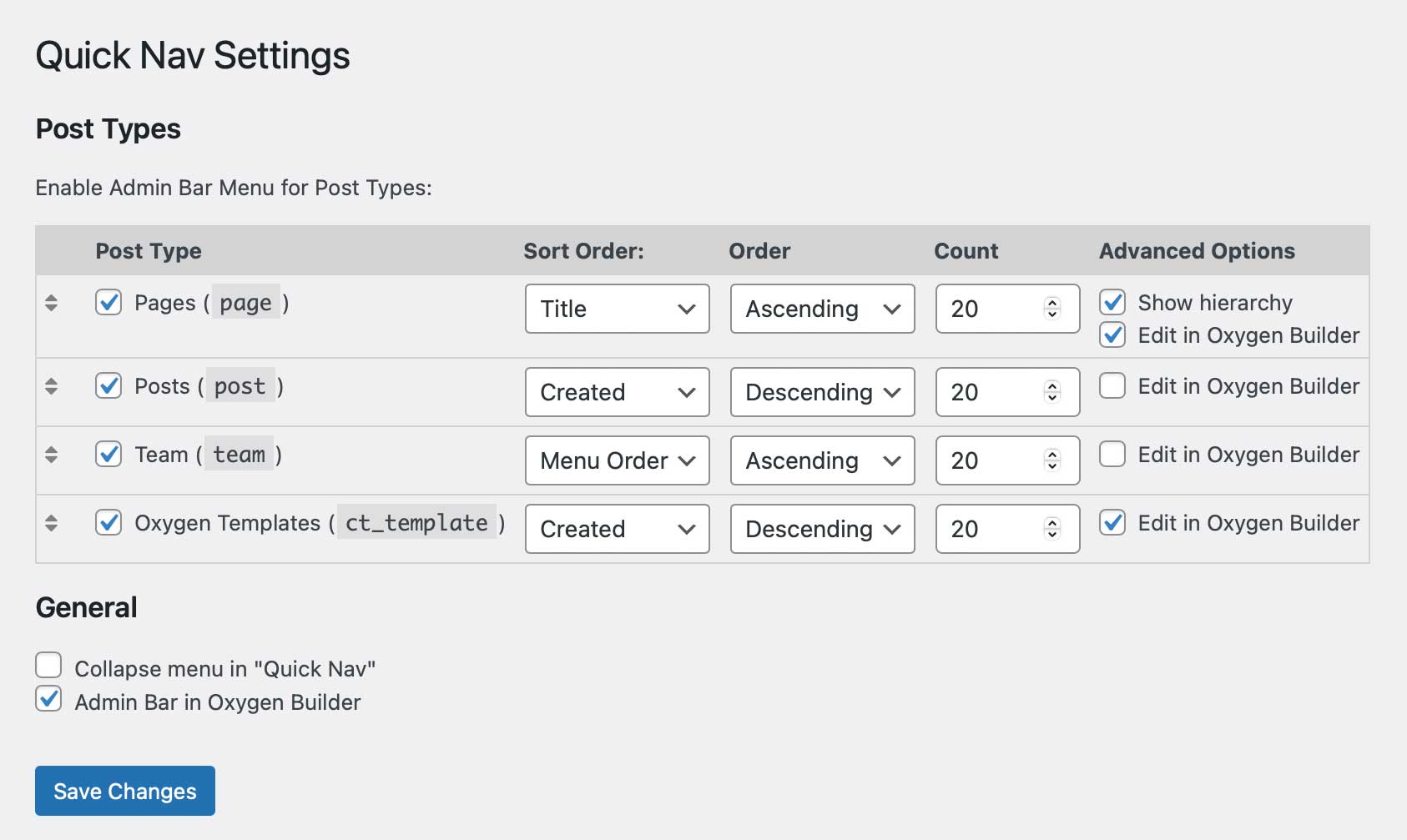
MA Admin Quick Nav supports the two builders Bricks and Oxygen (Classic).
For supported content types, editing with the respective builder can be activated.
Here is a comparison of the setting options when using Bricks and Oxygen:
In the general settings there is an option to display the top admin bar in the builder as well.
This is how that looks in in Bricks or Oxygen:
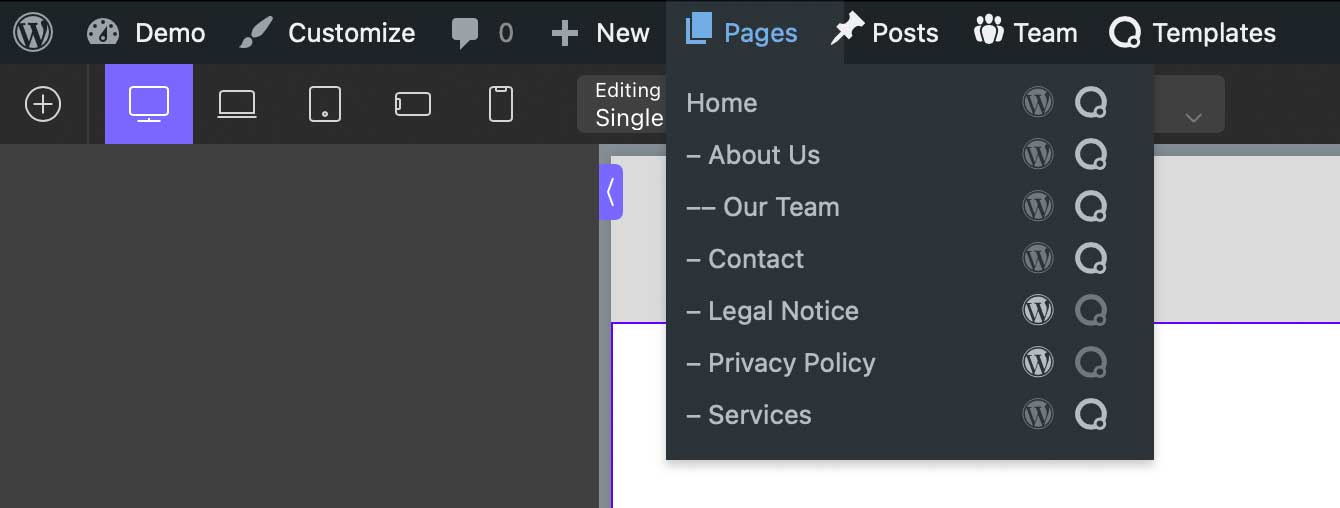
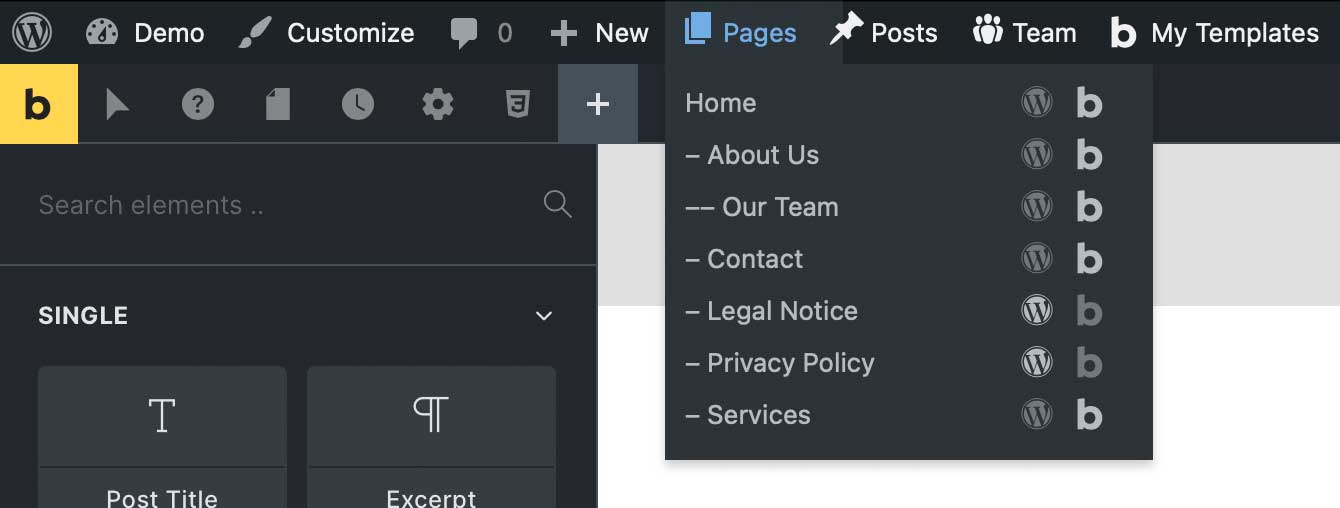
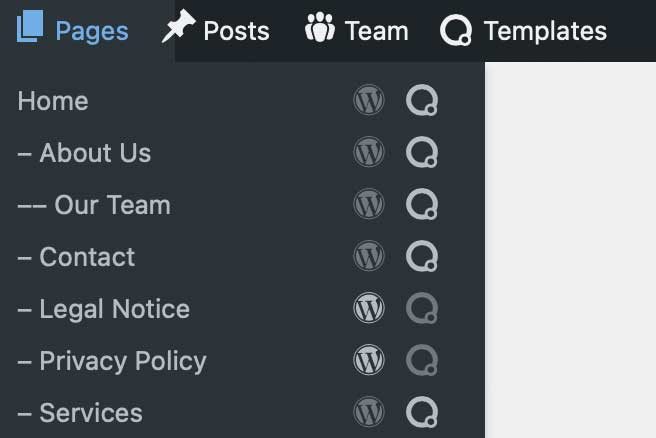
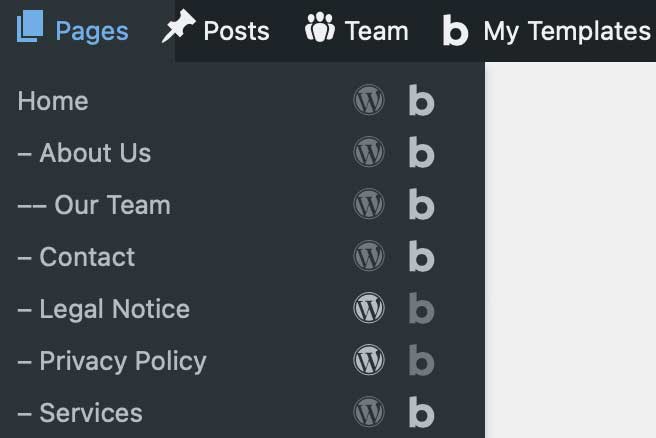
If builder support is activated, the lists in the quick navigation show icons for editing in WordPress and in the respective builder.
Darker or lighter icons indicate whether content is available in WordPress or the builder.
Here for comparison:
FAQ – Frequently Asked Questions
Sure. Simply click on the heading “Pages/Posts/…”.
The snippet does not provide an option for “open in new tab”.
A general setting is not useful, as the decision about opening in a new or the same tab is usually made depending on the use case. And additional icons for each link would unnecessarily clutter the interface.
There is a much simpler and more flexible solution:
Every modern browser (Chrome, Firefox, Safari) allows you to open a link in a new tab.
Either via right-click > Open in new Tab, or with a simple keyboard shortcut.
Windows: Ctrl-click
macOS: Cmd-click
The quick navigation takes full account of permissions.
- Users are only shown content types and posts that they can edit.
- This also applies in particular to the two builders Bricks and Oxygen, which provide their own permission management.
- The configuration of the quick navigation is reserved for users with admin rights.
With default settings, the quick navigation only lists posts with the status “Publish”.
On the Settings page you can also select other status.
Software Installation and Updates
Installation
The software can be installed using various methods:
Plugin:
The software is available as a plugin (ZIP archive) and can be installed in WordPress as a plugin.
Code Snippet:
The software can be run as a code snippet.
For the “Code Snippets” and “Advanced Scripts” plugins, a JSON file is available for download that can be directly imported there.
PHP:
The software can be downloaded as a PHP file.
This PHP file can be used in other code snippet plugins (copy & paste the code) or be included in your own WordPress child theme (require_once('path/to/the.php');).
Updates
The software automatically checks for available updates:
Plugin:
The update process follows standard WordPress methods: It checks for a new version every 12 hours.
The update can then be performed manually or automatically.

Code Snippet & PHP:
The software implements a special method that checks for updates even when installed as a snippet or PHP include. As with plugins, the check interval is set to 12 hours.
If a newer version is available, a notification will be shown in the admin area.

Download
Donation ❤️
I enjoy developing software and solving typical requirements with them.
The software is provided for free use.
If you like, you can honor my many hours of work with a small coffee donation via PayPal.
When clicking the button, a connection to PayPal is established.
Your donation will, of course, be taxed properly by me.
Disclaimer
I have developed and tested this software to the best of my knowledge.
I provide the software for free use.
I cannot give any guarantee for the functionality because of the countless possible variations in WordPress environments.
Download and use this software at your own risk and responsibility.
Change Log
- Version 2.0.4September 16, 2026Requires At Least WordPress: 5.8•Tested Up To WordPress: 7.1•Requires PHP: 7.4
Changes:
- Bricks Editor Interface: Moved bricks-toolbar-left/-right down below the Admin Bar
Tested:
- WordPress 7.1
- Bricks 2.4
- Version 2.0.3July 17, 2026Requires At Least WordPress: 5.8•Tested Up To WordPress: 7.0.2•Requires PHP: 7.4
Changes:
- CSS on settings page
- Adaptions for Bricks 2.4-beta2
Tested:
- WordPress 7.0.1, 7.0.2
- Bricks 2.3.7, 2.3.8, 2.3.9, 2.4-beta2
- Version 2.0.2Download not available.May 22, 2026Requires At Least WordPress: 5.8•Tested Up To WordPress: 7.0•Requires PHP: 7.4
New Features:
- With Polylang installed, a new language switcher menu allows to edit the same post (or page, template, ...) in any of the available translated languages.
The edit link opens the translated post in the same editor (Classic, Gutenberg, Bricks, Oxygen).
This optional feature can be enabled on the settings page.
- With Polylang installed, a new language switcher menu allows to edit the same post (or page, template, ...) in any of the available translated languages.
- Version 2.0.1Download not available.May 21, 2026Requires At Least WordPress: 5.8•Tested Up To WordPress: 7.0•Requires PHP: 7.4
Changes:
- Optimized Admin Bar DOM and CSS
- Converted all heredoc/nowdoc to output buffer
- When editing in Gutenberg or builder, current item in menu is marked in bold
- Moved plugin updater methods to separate class to reduce code snippet size
Tested:
- PHP 8.5
- WordPress 7.0
- Bricks 2.3.5
- Version 2.0.0Download not available.May 10, 2026Requires At Least WordPress: 5.8•Tested Up To WordPress: 6.9.4•Requires PHP: 7.4
New Features:
- Now available as Code Snippet, Include, and Plugin with automatic update check.
For snippet or include, checks for updates every 12 hrs (same frequency used by WP for plugin updates),
and shows update notice in admin area, dismissible for 12 hrs. Can also be checked manually on the Settings page.
For plugin, WordPress standard update mechanism is used.
Changes:
- Optimized CSS fix for Bricks >= 2.3.3:
Now using a variable instead of duplicating the whole CSS block with only one line changed - Optimized timing output (styling, indentation)
- Skip initialization for heartbeat AJAX requests, which are triggered every 15 seconds for "keep-alive" purposes only.
Localization:
- Added more specific translations, so we don't need to use WordPress core translations, which, in some cases, were tricky to construct fitting our context.
- Added localization for Dutch (nl_NL)
- Now available as Code Snippet, Include, and Plugin with automatic update check.
- Version 1.8.3Download not available.April 23, 2026Requires At Least WordPress: 5.8•Tested Up To WordPress: 6.9.4•Requires PHP: 7.4
Fixes:
- Corrected top position of panels in Bricks 2.3.3 Builder
- Version 1.8.2Download not available.April 12, 2026Requires At Least WordPress: 5.8•Tested Up To WordPress: 6.9.4•Requires PHP: 7.4
New Features:
- Support of custom menu_icon image URL (e.g. icon from media library for ACF CPT)
(Thanks to Aidan Gartland for reporting)
Code Improvements:
- Changed direct access to constants (e.g. CT_VERSION), to constant() calls
- Changed direct function calls (e.g. ct_get_post_builder_link()), to call_user_func() calls
- Support of custom menu_icon image URL (e.g. icon from media library for ACF CPT)
- Version 1.8.1Download not available.December 6, 2025Requires At Least WordPress: 5.8•Tested Up To WordPress: 6.9•Requires PHP: 7.4
New Features:
- Added support for localization.
Initially for German (de_DE), Italian (it_IT), French (fr_FR), and Spanish (es_ES).
More to follow on request.
Improvements:
- Don't embed CSS, SVG, and JS for anonymous requests or if Admin Bar is not shown
Tested:
- WordPress 6.9
- Bricks 2.1.4
- Added support for localization.
- Version 1.8.0Download not available.November 10, 2025
New Features:
- Custom Links: Create your own custom links to be shown in Admin Bar
- Support for WP Gutenberg Patterns (post type "wp_block")
- Detection if Gutenberg is enabled for any of the registered post types
- Setting to enable Patterns in Admin Quick Nav
- Setting to enable Patterns in Admin Menu
- Disable "View" action (not available for Patterns)
Changes:
- For post types with undefined menu icon, show dashicons-marker
- Version 1.7.5Download not available.October 12, 2025
Improvements:
- Consistent escaping
Tested:
- Bricks 2.1.2
- Version 1.7.4Download not available.June 6, 2025
Fixes:
- Fix for Bricks 2.0-alpha:
CSS adaptions for top and height of #bricks-panel, #bricks-preview, #bricks-structure
to use new --builder-toolbar-height (=48px, default 40px for older Bricks versions)
instead of hardcoded 40px - Ignore configured post type "bricks_template" if Bricks has been deactivated/uninstalled
Tested:
- Bricks 2.0-beta, backwards compatible to Bricks 1.12.4
- Fix for Bricks 2.0-alpha:
- Version 1.7.3Download not available.November 13, 2024
Compatibility WordPress 6.7:
- Changed permission check based on cap instead of capability_type (which is now array)
Fixes:
- CSS adaptions for Advanced Themer 2.9 on Bricks sites:
- Padding for search field on AT settings page
- Version 1.7.2Download not available.October 28, 2024
Fixes:
- Fix for quick search in Builder and frontend
- Version 1.7.1Download not available.October 11, 2024
Fixes:
- CSS adaptions for Advanced Themer 2.9 on Bricks sites:
- Additional spacing at top for full screen modes with Admin bar enabled
- Padding for search field
- CSS adaptions for Advanced Themer 2.9 on Bricks sites:
- Version 1.7.0Download not available.October 6, 2024
New Features:
- Added "Add new ..." link
(Requested by Jennifer Cisneros)
- Added "Add new ..." link
- Version 1.6.3Download not available.August 23, 2024
Fixes:
- CSS adaptions for Admin Bar in Oxygen 4.9 Builder
- Version 1.6.2Download not available.July 28, 2024
Fixes:
- When building menu sections/items, skip unregistered post types.
This situation can occur if a post type was configured in Quick Nav settings, but related plugin has been deactivated.
- When building menu sections/items, skip unregistered post types.
- Version 1.6.1Download not available.July 22, 2024
Fixes:
- Prevent fatal errors if no HappyFiles post types have been configured
(Thanks to Pascal Dörflinger for reporting)
- Prevent fatal errors if no HappyFiles post types have been configured
- Version 1.6.0Download not available.July 17, 2024
New Features:
- Support for HappyFiles folders
(Requested by Sebastian Berger)
- Support for HappyFiles folders
- Version 1.5.0Download not available.July 7, 2024
New Features:
- Quick Search
(Requested by John Kirker)
Changes:
- Optimized post limit detection (now checking all selected states)
- Quick Search
- Version 1.4.0Download not available.May 23, 2024
New Features:
- Optional display of Polylang language in Quick Nav lists
- Version 1.3.1Download not available.May 21, 2024
Changes:
- Compatibility to Oxygen 4.8.3 with changed post meta keys
- Version 1.3.0Download not available.April 9, 2024
New Features:
- Support for selecting status of posts to be listed
- Version 1.2.0Download not available.April 5, 2024
Changes:
- Disabled Polylang language filter to show all languages, also in frontend
- Changed some direct Bricks function calls to call_user_func() to avoid warnings in code editor on non-Bricks setups
- Version 1.1.0Download not available.February 7, 2024
New Features:
- New action "View" (except for Oxygen/Bricks templates)
- Version 1.0.2Download not available.February 3, 2024
Fixes:
- Corrected semantical issue by moving svg symbols from head to footer
- Corrected action icon width.
- Version 1.0.1Download not available.January 30, 2024
Fixes:
- Added additional permission check for Bricks templates
- Version 1.0.0Download not available.January 28, 2024
Changes:
- Stretch sub menu item links
- Improved translation
- Empty limit now means unlimited
Inspired by Michael Pucher:
- Sortable post types
- Collapsed or individual menus for post types
- Allow sorting by menu_order
- Removed title attribute from top menu because that tooltip is distracting
- Version 0.0.1Download not available.January 20, 2024
Internal test version supporting Oxygen and Bricks