
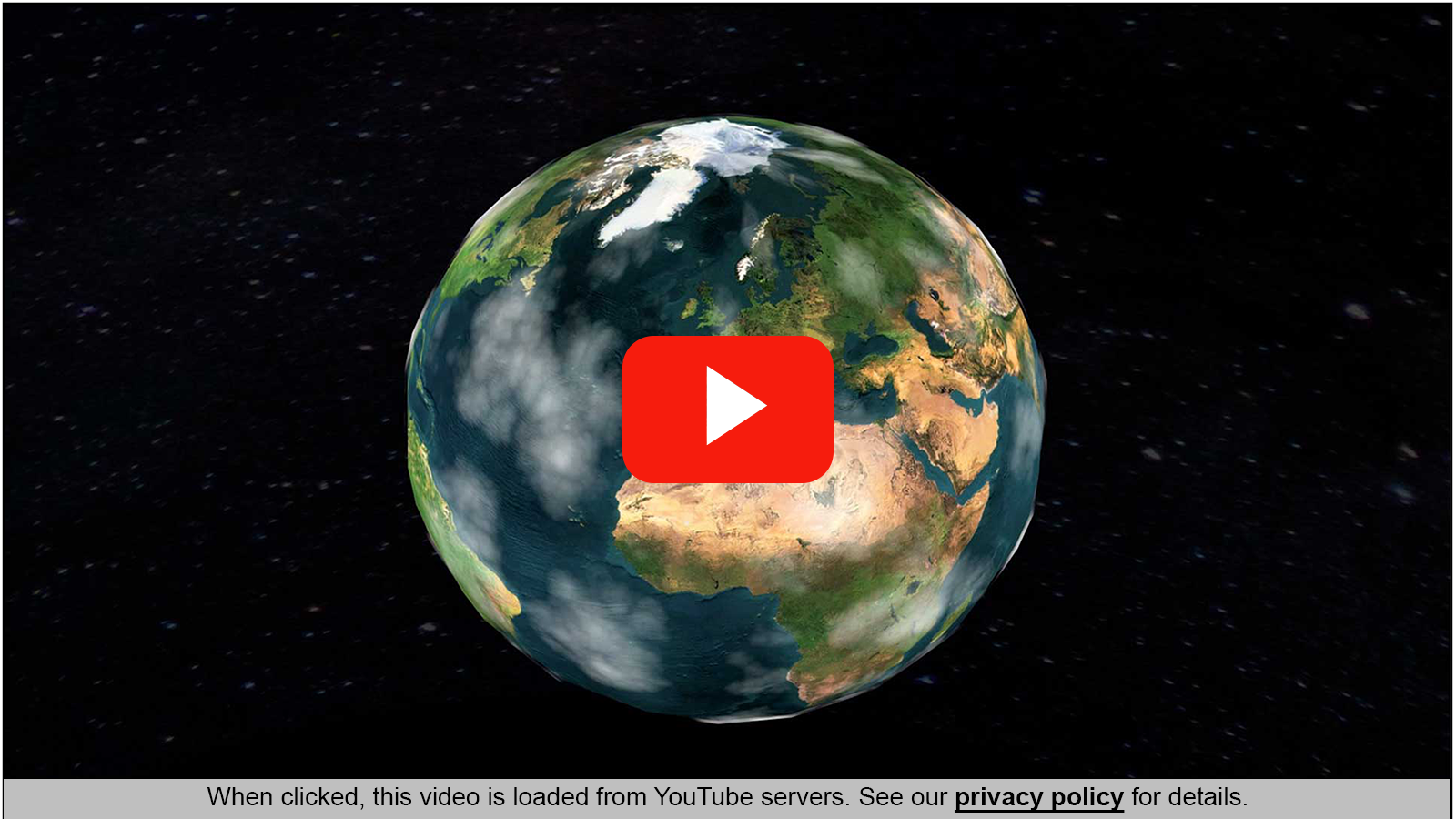
Also available for Vimeo and other external content!
Introduction
YouTube videos are embedded on many websites.
If you use the standard embedding methods provided by WordPress (Classic Editor, Gutenberg) or page builders (Beaver, Bricks, Divi, Elementor, Oxygen, WPBakery, and many others) for this purpose and don’t ask for the visitor’s consent beforehand, you’ll probably violate the General Data Protection Regulation (GDPR) in the EU: When displaying a page that contains a YouTube video, a connection to the YouTube servers is automatically established in order to load the preview image. In the process, the visitor’s IP address, browser information, and more details about the visitor, and thus personal information, is transmitted to YouTube. That’s not allowed without explicit consent.
So how can you embed YouTube videos on your website in a GDPR compliant way?
Solution
MA GDPR YouTube provides a WordPress shortcode that enables a GDPR compliant and at the same time as simple and efficient as possible embedding of YouTube videos.
Using this shortcode, the preview image for the video is already retrieved from the YouTube server and cached locally on your own server. The visitor’s browser is given this local preview image, along with a note about the privacy policy. The browser does not need to establish a connection to YouTube at this point. The actual video, the required player, and more data is only loaded from YouTube once the visitor has clicked on it. This procedure is GDPR compliant because the visitor must first actively confirm that he wants to load the video from YouTube.
To view the video, the special domain youtube-nocookie.com is used, which reduces the use of cookies by YouTube.
MA GDPR YouTube also has a significant positive impact on the page load speed, and therefore also on popular speed test tools (Page Speed Insights, GTMetrix, etc.), as no data is loaded from external servers until the visitor has given their consent.
Why a Shortcode?
Using a shortcode is the most versatile way to ensure availability across the entire WordPress ecosystem.
- Universal Compatibility: Shortcodes work seamlessly across the Classic Editor, Gutenberg (Block Editor), and popular page builders like Beaver, Bricks, Divi, Elementor, Oxygen, WPBakery, and many more.
- Theme Flexibility: Unlike hard-coded scripts, shortcodes can be placed within widgets, sidebars, or custom templates, ensuring functionality regardless of the theme’s layout.
- Simplicity & Speed: It provides a lightweight, “copy-paste” solution that allows to trigger complex logic without needing to write a single line of code.
- Future-Proof: Even if the theme or editor is changed, the shortcode remains functional, keeping the videos visible without extra configuration.
- Granular Control: Thanks to dozens of parameters within the shortcode, the appearance and functionality – such as dimensions, texts, meta data – can be controlled precisely on a per-video basis.
Shortcode
The simplest and shortest syntax for the shortcode is:
[ma-gdpr-youtube video="9UGPZ64po9g"]where 9UGPZ64po9g is the ID of the YouTube video. You can easily copy the ID from the URL of the YouTube video:

This shortcode can easily be written directly as a new paragraph in the Classic editor.
Gutenberg provides a Shortcode block.
Also in page builders, there is usually a separate “Shortcode” element available for this purpose.
This shortcode generates the following output:

In the center, the thumbnail is overlaid by the play button similar to the one on YouTube.
At the bottom, the visitor sees a note on privacy policy in a colored bar.
Thumbnail
The thumbnail is loaded once from YouTube, cached on our own server, and then served to the visitor from there.
Formats
Different image formats are retrieved:
| Format Name | Aspect Ratio | Size |
|---|---|---|
| mqdefault | 16:9 | 320 x 180 px |
| hqdefault | 4:3 | 480 x 360 px |
| sddefault | 4:3 | 640 x 480 px |
| hq720 | 16:9 | 1280 x 720 px |
| maxresdefault | 16:9 | Original size, e.g. 1920 x 1080 px |
The image formats are used for optimal display of the thumbnail in different screen resolutions.
MA GDPR YouTube uses the higher resolution thumbnail already at half of the next higher resolution to improve the display quality.
Notes:
- Although YouTube states in the documentation that the above formats are always available, some formats are missing for some videos. MA GDPR YouTube detects this and uses a suitable of the available formats instead.
- The mentioned image formats are offered to the browser in the two file formats JPG and WEBP. The browser decides itself which format is loaded. This is for compatibility with older browsers.
- The browser will be provided with a choice of all image sizes. The browser decides itself which image size to load.
Cache
The thumbnails loaded from YouTube are automatically stored on the server in the /wp-content/uploads/ma-gdpr-youtube/ directory. The directory is created automatically if it doesn’t already exist. A separate subdirectory is created for each video ID.
Shortcode Parameters
For the shortcode to work, it is mandatory to specify the desired YouTube video with the video parameter.
In addition, the shortcode allows some more parameters, which are explained below.
video
The video parameter is used to specify a YouTube ID or a YouTube URL for the desired video.
The Video ID is currently usually 11 digits long and can contain letters, numbers, hyphens and underscores.
If a URL is specified, the ID is automatically determined from it. Numerous variants of YouTube URLs are supported.
Samples:
[ma-gdpr-youtube video="9UGPZ64po9g"][ma-gdpr-youtube video="https://www.youtube.com/watch?v=9UGPZ64po9g"][ma-gdpr-youtube video="https://youtu.be/9UGPZ64po9g"]aspect-ratio
The default aspect ratio for YouTube videos is 16:9.
The aspect-ratio parameter allows you to use a different aspect ratio, such as 4:3 or 1:1 (square).
Any aspect ratio can be specified here as long as the syntax is kept as two numbers separated by a colon or a slash: “width:height” or “width/height”
The thumbnail and the YouTube Player will automatically fit the aspect ratio specified here. The video itself will be shown in the original aspect ratio, possibly then with black bars.
Example:
[ma-gdpr-youtube video="9UGPZ64po9g" width="350px" aspect-ratio="1:1"]gdpr-text
MA GDPR YouTube defines a notice text about the privacy policy in different languages:
| Language | Text |
|---|---|
| DA | Når du har trykket, vil videoen blive indlæst fra YouTube’s servere. Se vores {privatlivspolitik} for flere informationer. |
| DE | Bei Klick wird dieses Video von den YouTube Servern geladen. Details siehe {Datenschutzerklärung}. |
| EN | When clicked, this video is loaded from YouTube servers. See our {privacy policy} for details. |
| ES | Al hacer clic, este vídeo se carga desde los servidores de YouTube. Consulte la {política de privacidad} para más detalles. |
| FI | Klikattuasi, tämä video ladataan Youtuben palvelimilta. Katso lisätietoja meidän {tietosuojaselosteesta}. |
| FR | En cliquant, cette vidéo est chargée depuis les serveurs de YouTube. Voir la {politique de confidentialité}. |
| HU | Kattintás után ez a videó a Youtube szervereiről kerül lejátszásra. A részletekért olvassa el az {Adatkezelési Tájékoztatót} oldalt. |
| IT | Quando si clicca, questo video viene caricato dai server di YouTube. Vedere {l’informativa sulla privacy} per i dettagli. |
| JA | クリックすると、この動画が YouTube サーバーから読み込まれます。詳細については、{プライバシー ポリシー} をご覧ください。 |
| NL | Na het klikken wordt deze video geladen vanaf de servers van YouTube. Zie ons {privacybeleid} voor meer informatie. |
The language is selected based on your website’s or page language. Polylang is supported.
If no default text is available for your page’s language, English is selected instead.
The text in curly brackets is replaced with a link to the privacy policy page configured in WordPress (Settings > Privacy), with the text in brackets serving as the link text.
The notice text can be customized to your own requirements, for example other languages, via parameter gdpr-text.
Example:
[ma-gdpr-youtube video="9UGPZ64po9g" gdpr-text="Please read our {privacy policy} before clicking."]The parameter gdpr-text can also be set to be empty. In this case, no hint text is displayed at all.
This can be useful, for example, if several videos are displayed on a page and the note text should be displayed once centrally rather than for each individual video.
[ma-gdpr-youtube video="9UGPZ64po9g" gdpr-text=""]gdpr-text-size
By default, the notice text is displayed in the font size 0.7em, i.e. 70% of the text size defined for this block.
The gdpr-text-size parameter can be used to adjust the text size to your own requirements. Any valid CSS specification for the text size is allowed.
Example:
[ma-gdpr-youtube video="9UGPZ64po9g" gdpr-text-size="20px"]notice-style
The design of the privacy notice can be customized as needed.
White font on blue bar? No problem!
Example:
[ma-gdpr-youtube video="9UGPZ64po9g" notice-style="background-color:blue; color:white"]notice-class
With an own CSS class this can be done even more targeted. For example, you can also control the design of the link:
Example:
<style>
body .my-notice-class {
  background-color: blue;
  color:white;
}
body .my-notice-class a {
  font-weight: bold;
  font-size: 110%;
}
</style>
[ma-gdpr-youtube video="9UGPZ64po9g" notice-class="my-notice-class"]width
By default, a width of 100% is set for the video block. The video block thus occupies the entire width of the enclosing block, e.g. a DIV or a column. The default of 100% allows easy adjustment of the responsive view by the parent element.
The height is automatically calculated from the width and aspect ratio.
If needed, the width can be changed with the width parameter. All valid CSS specifications for the width of an element are allowed.
Example:
[ma-gdpr-youtube video="9UGPZ64po9g" width="300px"]Note: I recommend to leave the width at the default of 100% and instead style the enclosing block for responsive viewports using CSS media queries.
alt / title
The alt and title parameters set the corresponding HTML attributes for the preview image.
The alt attribute is used to support search engines and accessibility.
The title attribute provides the tooltip text.
[ma-gdpr-youtube video="9UGPZ64po9g" alt="A video showing Planet Earth" title="Planet Earth"]The original title of the video and other metadata can also be used in these parameters.
thumbnail
With the parameter thumbnail you can use your own thumbnail instead of the one loaded from YouTube.
Either a full URL to an image can be specified here, or the media ID of an image that has already been uploaded to WordPress.

[ma-gdpr-youtube video="9UGPZ64po9g" thumbnail="/wp-content/uploads/2026/04/ma-gdpr-youtube_custom-thumbnail.jpg"]
[ma-gdpr-youtube video="9UGPZ64po9g" thumbnail="3841"](Photo Credit: NASA/Reid Wiseman)
title-text
MA GDPR YouTube shows the preview image from YouTube by default, but no title to the video.
The parameter title-text can be used to display a title above the preview image.
[ma-gdpr-youtube video="9UGPZ64po9g" title-text="Planet Earth"]The title is displayed by default in the top left corner, white font in standard size, with a subtle shadow to make the text readable even on bright thumbnails.
The original title of the video and other metadata can also be used in this parameter.
title-style
The default style for the title is defined as:
.ma-gdpr-youtube-title {
  position:absolute;
  width: 100%;
  top: 1em;
  padding: 0 1em;
  color: white;
  text-shadow: black 1px 1px 2px;
}
The parameter title-style can be used to adjust the positioning and design of the title.
Positioning
[ma-gdpr-youtube video="9UGPZ64po9g"title-text="Planet Earth" title-style="top:unset; bottom:30%; text-align:center"]Design
[ma-gdpr-youtube video="9UGPZ64po9g" title-text="Planet Earth" title-style="top:1rem; font-size:2em; color:red; text-align:center;"]title-class
To globally control the positioning and design of the titles, the parameter title-class allows to specify a global CSS class.
Beispiel:
<style>
body .my-video-title-class {
  top: 1rem;
  font-size: 1.5em;
  line-height: 1;
  color: blue;
  text-align: center;
}
body .my-video-title-class span {
  display: inline-block;
  transform: rotate(-15deg);
  color:red;
}
</style>
[ma-gdpr-youtube video="9UGPZ64po9g" title-text="Planet Earth <span>with Class</span>" title-class="my-video-title-class"]play-button
MA GDPR YouTube provides different play button types.
The default button type is youtube, which does not need to be specified explicitly.
The parameter play-button can be used to select the desired button:
Button youtube
[ma-gdpr-youtube video="9UGPZ64po9g" play-button="youtube"]Button circle
[ma-gdpr-youtube video="9UGPZ64po9g" play-button="circle"]Button circle-o
[ma-gdpr-youtube video="9UGPZ64po9g" play-button="circle-o"]Button play
[ma-gdpr-youtube video="9UGPZ64po9g" play-button="play"]play-button-color
The color of the YouTube Play button is #f61c0d. The other button types have white as default color.
The parameter play-button-color can be used to set a different color for the button.
[ma-gdpr-youtube video="9UGPZ64po9g" play-button-color="blue"][ma-gdpr-youtube video="9UGPZ64po9g" play-button="circle" play-button-color="green"][ma-gdpr-youtube video="9UGPZ64po9g" play-button="circle-o" play-button-color="black"]play-button-class
The parameter play-button-class allows you to use a custom CSS class for the play button.
A green play button on the “Green Energy” page (Post ID 3852)? No problem!
Beispiel:
<style>
body.postid-3852 .my-play-button {
  color:green;
}
</style>
[ma-gdpr-youtube video="9UGPZ64po9g" play-button-class="my-play-button"]start
With the parameter start you can start the video playback at a specific position in seconds..
This works fine with the embedded player as well as videos opened in a new window (see parameter new-window).
[ma-gdpr-youtube video="9UGPZ64po9g" start=5][ma-gdpr-youtube video="9UGPZ64po9g" start=5 new-window=1]new-window
The parameter new-window opens the video in a new browser tab directly on the YouTube page.
This may be desirable if you want to display only very small thumbnails of the videos in WordPress, which are unsuitable for direct integration of the player.
[ma-gdpr-youtube video="9UGPZ64po9g" new-window=1]Global Parameters
All shortcode parameters can be defined globally.
This simplifies the uniform design of the videos and spares the definition of the parameters for each individual video.
For this purpose, a global variable $GLOBALS['ma_gdpr_youtube'] is created as an array and supplied with the desired settings.
This can be done quite easily with a code snippet with e.g. the following content:
$GLOBALS['ma_gdpr_youtube'] = [
 'play-button' => 'play',
 'play-button-class' => 'my-play-button',
];
A special solution applies here to the gdpr-text parameter, which is language-sensitive.
The specification of a global parameter gdpr-text sets the text globally to a uniform value.
The addition of a language flag controls the text output per language.
$GLOBALS['ma_gdpr_youtube'] = [
 'gdpr-text' => 'Read the {privacy policy}.',
 'gdpr-text-de' => 'Info zum {Datenschutz}',
];
More YouTube Parameters
YouTube itself offers even more parameters for controlling video playback and the appearance of the player.
An overview of the available parameters can be found here: https://developers.google.com/youtube/player_parameters
Caution! Only the English version of this page is up to date. Language switching is done on the top right of the page using the language selection list.
Examples:
| Parameter | Meaning |
|---|---|
rel=0 | When paused or at the end of the video, “Similar videos” are displayed. This cannot be turned off. But you can control which videos are shown: rel=1 Similar videos from the whole YouTube archiverel=0 Similar videos only from the current channel |
modestbranding=1 | By default, a YouTube logo is displayed at the bottom of the player. With modestbranding=1 this logo is hidden. |
fs=0 | By default, an icon button is displayed for full-screen display of the video. With fs=0 this button will not be displayed. |
YouTube Player API
When clicking on a video, the YouTube Player is loaded from the YouTube servers via YouTube Player API.
All the usual YouTube functions are available here.
In MA GDPR YouTube, the YouTube player is implemented in a way that when clicking on a video, a possibly other, already running video is paused. Thus, multiple videos will not run at the same time.
YouTube Metadata
YouTube provides a whole range of additional metadata for each video.
Using special tags, this metadata can be transferred to the parameters alt, title, and title-text.
| Tag | Bedeutung |
|---|---|
@title@ | Original title of the video |
@description@ | Description for the video |
@genre@ | Genre of the video |
@author_name@ | Name of the author |
@author_url@ | URL of the author’s profile |
@duration_hms@ | Duration of the video in format hh:mm:ss |
Some metadata, such as title and description, may be provided by YouTube in different languages. In this case, they will automatically be displayed in the language currently used on the website.
Sample:
[ma-gdpr-youtube video="9UGPZ64po9g" alt="@description@" title="@title@" title-text="@title@<br>@description@<br>@genre@<br>@author_name@"]On the German version of this page you’ll see the German title of this video.
Animation erstellt in Blackmagic Fusion 8
Travel & Events
Matt Hias
Notes on page builders
Oxygen (Classic) Builder
When closing Oxygen (Classic) Modals, the src attribute of IFrames is reset to stop the video.
Oxygen implements this with this.src = this.src.
This simultaneously removes all event handlers of MA GDPR YouTube.
When a modal is closed, the video is stopped, but MA GDPR YouTube loses all control over the state of the video.
From this point on, MA GDPR YouTube can no longer automatically stop videos when a new video is started.
Settings
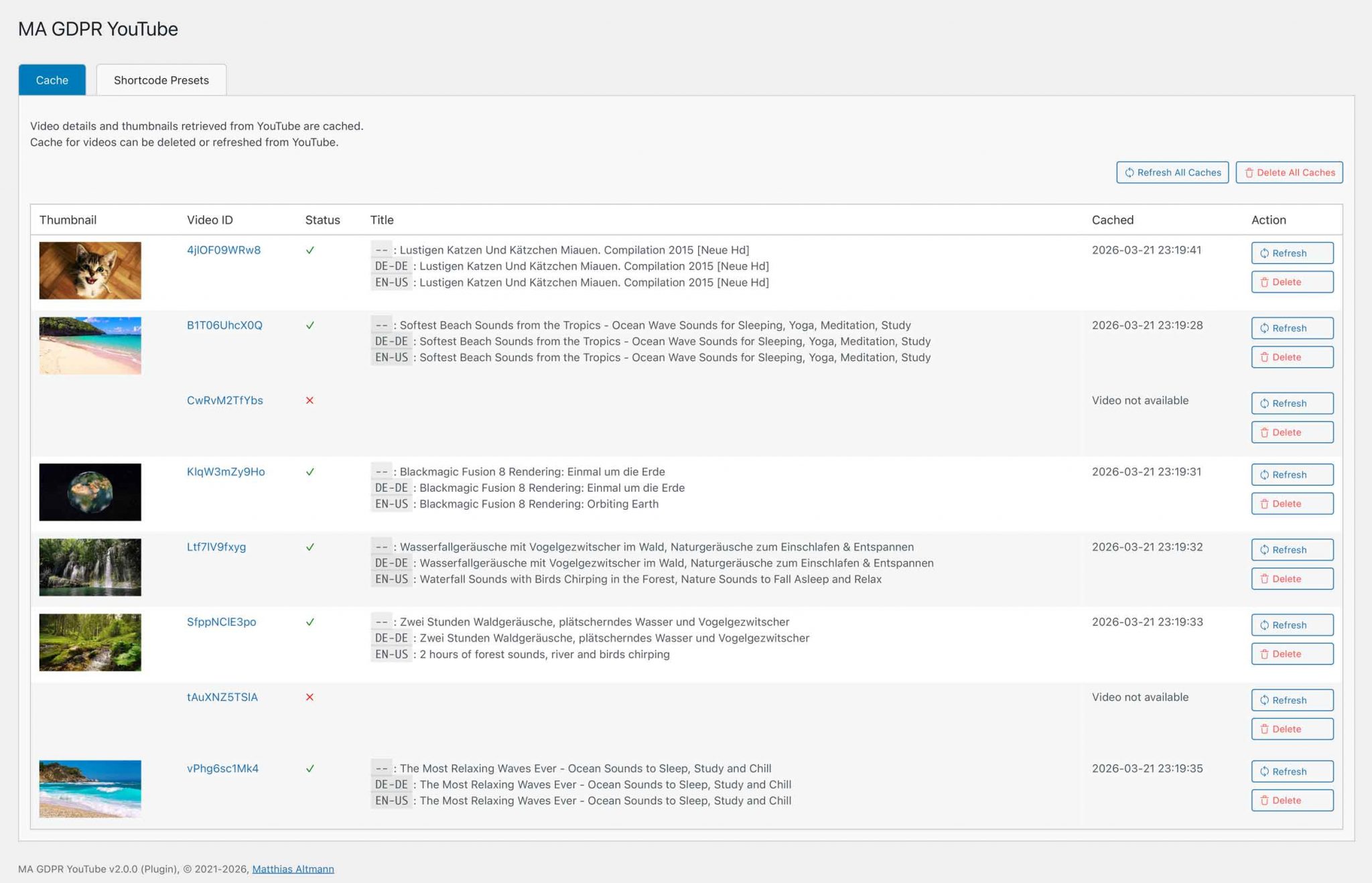
WordPress Admin Menu > Settings > MA GDPR YouTube displays the administration pages where you can manage the cache and configure the shortcode settings.
Cache
This page allows you to manage the cache.
It displays all cached videos along with their key details.
You can delete individual videos or all videos from the cache, or refresh them from YouTube.
Note:
If the cache for a video that is still embedded on a page is deleted, the video cache will be automatically regenerated the next time the page is loaded.
Shortcode Presets
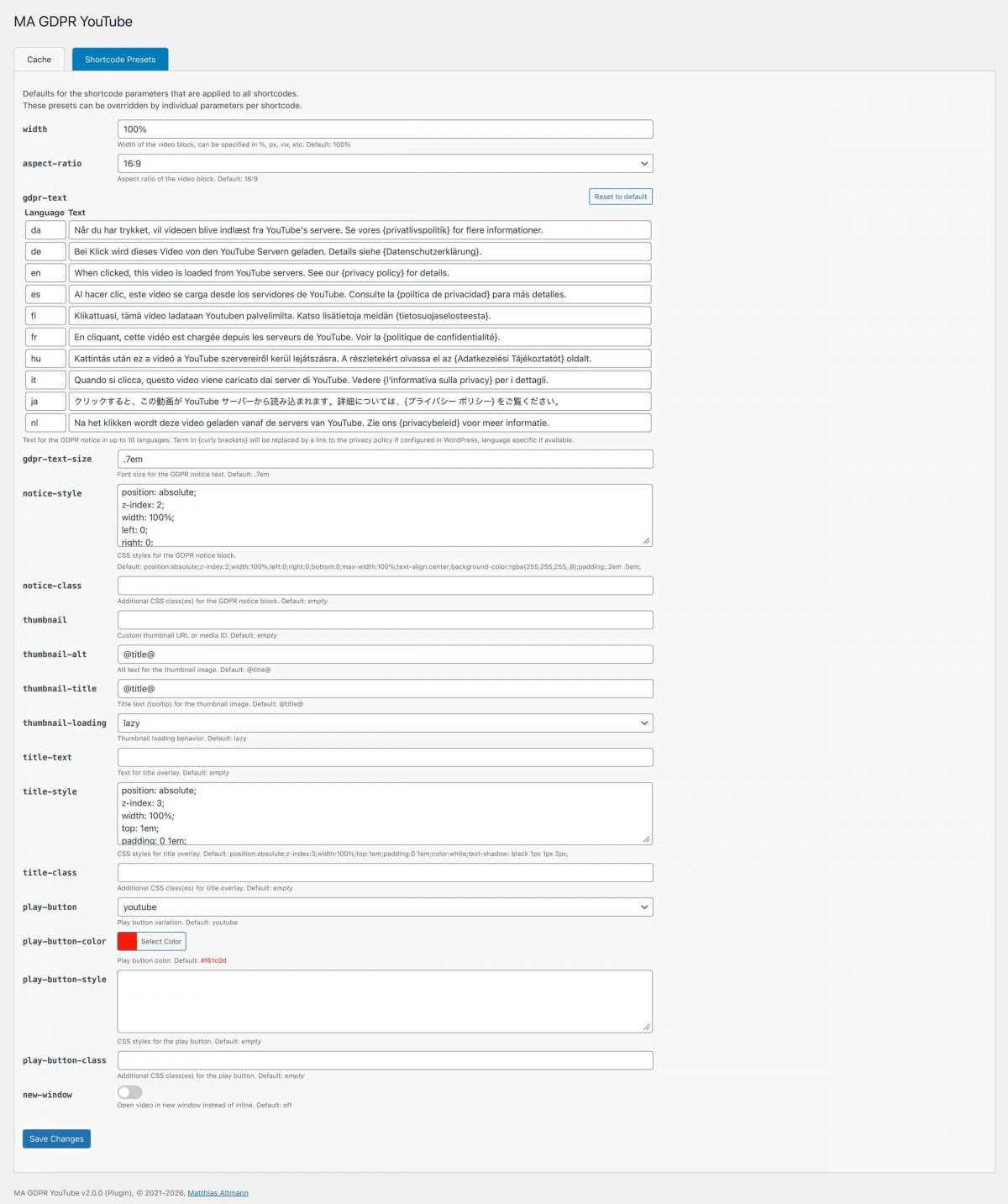
On this page, you can set global defaults for shortcodes.
For example, if you want to apply a specific style throughout the entire website, you can specify it here centrally rather than as a parameter for each individual shortcode.
However, these global defaults can be overridden for individual shortcodes using parameters if necessary.
Tip:
The GDPR text can be provided in up to 10 languages.
If another language is needed, you can simply overwrite an existing language.
FAQ – Frequently Asked Questions
Safari provides a setting “Auto-Play” for media.
If this setting is set to “Never Auto-Play” or “Stop media with sound”, the automatic start of the video is suppressed.
Unfortunately, I am not aware of any way to bypass this lock.
Yes, by using SVG code.
For this we need a SVG symbol definition. Add a code block at the end of your page:
(In Gutenberg as HTML, in Oxygen as Code Block).
<svg version="1.1" xmlns="http://www.w3.org/2000/svg" xmlns:xlink="http://www.w3.org/1999/xlink" aria-hidden="true" style="position: absolute; width: 0; height: 0; overflow: hidden;">
  <defs>
    <symbol id="ma-gdpr-youtube-play-button-custom" viewBox="0 0 20 20">
      <path fill="currentColor" d="M5 20c-0.128 0-0.256-0.049-0.354-0.146-0.195-0.195-0.195-0.512 0-0.707l8.646-8.646-8.646-8.646c-0.195-0.195-0.195-0.512 0-0.707s0.512-0.195 0.707 0l9 9c0.195 0.195 0.195 0.512 0 0.707l-9 9c-0.098 0.098-0.226 0.146-0.354 0.146z"/>
    </symbol>
  </defs>
</svg>
At the ID, after ma-gdpr-youtube-play-button-, you specify the desired identifier, e.g. custom, for your own play button.
The <path /> is the SVG code for your own button. If you specify fill="currentColor" here, you can control the color of the button with the shortcode parameter play-button-color.
Please also adapt the viewBox to your SVG code.
In your shortcode you can now select your own button with the parameter play-button="custom".
Software Installation and Updates
Installation
The software can be installed using various methods:
Plugin:
The software is available as a plugin (ZIP archive) and can be installed in WordPress as a plugin.
Code Snippet:
The software can be run as a code snippet.
For the “Code Snippets” and “Advanced Scripts” plugins, a JSON file is available for download that can be directly imported there.
PHP:
The software can be downloaded as a PHP file.
This PHP file can be used in other code snippet plugins (copy & paste the code) or be included in your own WordPress child theme (require_once('path/to/the.php');).
Updates
The software automatically checks for available updates:
Plugin:
The update process follows standard WordPress methods: It checks for a new version every 12 hours.
The update can then be performed manually or automatically.

Code Snippet & PHP:
The software implements a special method that checks for updates even when installed as a snippet or PHP include. As with plugins, the check interval is set to 12 hours.
If a newer version is available, a notification will be shown in the admin area.

Download
Donation ❤️
I enjoy developing software and solving typical requirements with them.
The software is provided for free use.
If you like, you can honor my many hours of work with a small coffee donation via PayPal.
When clicking the button, a connection to PayPal is established.
Your donation will, of course, be taxed properly by me.
Disclaimer
I have developed and tested this software to the best of my knowledge.
I provide the software for free use.
I cannot give any guarantee for the functionality because of the countless possible variations in WordPress environments.
Download and use this software at your own risk and responsibility.
Change Log
- Version 2.0.2August 21, 2026Requires At Least WordPress: 5.8•Tested Up To WordPress: 7.1•Requires PHP: 7.4
Fixes:
- In rare cases, YouTube provides thumbnails for certain sizes only as JPG, but not as WebP.
Missing WebP thumbnails now no longer trigger a reload attempt.
(Thanks to David Ross for analyzing and reporting)
Changes:
- Settings: Optimized CSS, auto-sizing for textarea fields.
- Settings: Fixed form value validation for text and select fields
Tested:
- WordPress 7.1
- Bricks 2.3.11
- In rare cases, YouTube provides thumbnails for certain sizes only as JPG, but not as WebP.
- Version 2.0.1May 21, 2026Requires At Least WordPress: 5.8•Tested Up To WordPress: 7.0•Requires PHP: 7.4
Changes:
- Moved plugin updater methods to separate class to reduce code snippet size
Tested:
- PHP 8.5
- WordPress 7.0
- Bricks 2.3.5
- Version 2.0.0Download not available.May 10, 2026Requires At Least WordPress: 5.8•Tested Up To WordPress: 6.9.4•Requires PHP: 7.4
New Features:
- Now available as Code Snippet, Include, and Plugin with automatic update check.
For snippet or include, checks for updates every 12 hrs (same frequency used by WP for plugin updates),
and shows update notice in admin area, dismissible for 12 hrs. Can also be checked manually on the Settings page.
For plugin, WordPress standard update mechanism is used. - Settings > MA GDPR Youtube
- Manage the video cache (thumbnails and meta data retrieved from YouTube):
Cache can be deleted or refreshed from YouTube. - Configure presets values for shortcode parameters
- Manage the video cache (thumbnails and meta data retrieved from YouTube):
Changes:
- Predefined GDPR texts for different languages
Now handle the privacy policy term in curly brackets instead of %s placeholder plus
separate term. This simplifies editing the texts on the settings page.
Caution! Old syntax (%s placeholder plus separate term) is not supported anymore.
If you used the $GLOBALS method to define GDPR texts, this must be adapted to the new format. - Languages:
Use locale (e.g. de-DE) instead of slug (e.g. de) for YouTube requests to retrieve
translated titles more reliably. Use dash instead of underscore for locale.
Use site language as fallback if current language not available (e.g. when saving
Gutenberg content) - Error handling and logging:
- Added more specific error messages for different failure points (e.g. thumbnail
retrieval, video info retrieval, parsing errors) - Logging request URL and video ID for failed YouTube requests to identify
problematic videos. - If basic video data (title, author, thumbnail, duration) is empty after retrieval
from YouTube, the video is considered as unavailable, and an error message is shown. - Handling non-existing manual thumbnails:
If a manual thumbnail is specified but not found, fall back to YouTube thumbnails
- Added more specific error messages for different failure points (e.g. thumbnail
- Added proper html and attribute escaping, and using kses for attributes that allow HTML (title, gdpr-text)
- Changed shortcode parameter 'priority' (boolean) to 'thumbnail-loading' (lazy or eager with fetchfiority=high).
- Storage of YouTube HTML response must now manually be activated via $yt_store_response
- Requests to YouTube now send Client Hints (Sec-CH-UA...) to improve bypassing YouTube restrictions.
Fixes:
- Added width/height attributes to SVG symbol definition, to avoid a gap at the page end in Bricks Builder.
That gap was caused by a Bricks CSS rule to set a min-width/height for <svg> without width/height attributes.
(Thanks to Stephen Vaughan for reporting!)
- Now available as Code Snippet, Include, and Plugin with automatic update check.
- Version 1.8.2Download not available.March 21, 2026Requires At Least WordPress: 5.3•Tested Up To WordPress: 6.9•Requires PHP: 7.4
Changes:
- get_current_language() can now return slug (de) and locale (de-DE) language codes.
Locale is used for YouTube requests to retrieve translated titles more reliably. - Stored HTML response from YouTube now also contains request and response headers
as comments.
- get_current_language() can now return slug (de) and locale (de-DE) language codes.
- Version 1.8.1Download not available.December 15, 2025Requires At Least WordPress: 5.3•Tested Up To WordPress: 6.9•Requires PHP: 7.4
Fixes:
- Corrected thumbnailUrl parse pattern
Changes:
- HTML Response from YouTube is now always stored to allow analysis.
Therefore, cache folder is created directly after retrieval of response, also if an error occurred during parsing. - Description and keywords from meta itemprop, fallback meta name, to prioritize video info over page info.
For keywords read from itemprop, adding spaces after commas.
- Version 1.8.0Download not available.December 14, 2025Requires At Least WordPress: 5.3•Tested Up To WordPress: 6.9•Requires PHP: 7.4
New Features:
- More details retrieved from YouTube: Canonical video URL, Thumbnail URL, Author details (name, profile URL), Duration (in seconds and h:m:s format)
- New related tags for title, alt, title-text attributes: @author_name@, @author_url@, @duration_hms@
- Microdata (<meta itemprop...>) added to video wrapper div for better SEO.
(Thanks to Hubertus Pohlmann for the suggestion)
Please note that the original props from YouTube are used, not the custom ones, like customized title.
Changes:
- Skipping retrieval of video details if the video ID is shorter than 11 characters to avoid creating invalid video folders and JSON files.
This is especially important for Bricks Builder, which executes shortcodes while still typing in the editor. - When downloading details from YouTube, the snippet version is stored in the JSON file.
This allows to check if the JSON (and thus video details) are retrieved and parsed with an older version of the snippet, and should be retrieved again to assure all details are available. - Thumbnails are now retrieved using cURL instead of file_get_contents to avoid the requirement for allow_url_fopen.
(Thanks to Roland Laich for the suggestion) - Replaced error suppression (@ operator) with try-catch
- Version 1.7.5Download not available.--
New features:
- New shortcode parameter "priority" (0/1) to control the loading behavior of the video thumbnail, e.g. if video is placed above the fold.
priority=0: loading="lazy" (default)
priority=1: loading="eager" fetchpriority="high"
(Thanks to Tobias Haas for the feature request)
(This version hasn't been published officially)
- New shortcode parameter "priority" (0/1) to control the loading behavior of the video thumbnail, e.g. if video is placed above the fold.
- Version 1.7.4Download not available.July 17, 2025Requires At Least WordPress: 5.3•Tested Up To WordPress: 6.8.2•Requires PHP: 7.4
Fixes:
- Replace "u0026" with "&" in YouTube video title.
(Thanks to Tobias Haas for reporting)
>> Video folder in /wp-content/uploads/ma-gdpr-youtube/ must be deleted manually to re-trigger video metadata retrieval and storage.
- Replace "u0026" with "&" in YouTube video title.
- Version 1.7.3Download not available.October 14, 2024
Changes:
- Retrieval of video details now uses cURL for better handling of YouTube responses.
(Thanks to Oscar Obianenue for reporting and supporting analysis and tests)
- Retrieval of video details now uses cURL for better handling of YouTube responses.
- Version 1.7.2Download not available.October 11, 2024
Fixes:
- Fixed missing styling of video preview (play button, GDPR text) in Bricks builder.
- Version 1.7.1Download not available.July 3, 2024
Changes:
- Added width and height attributes for thumbnail images
- Player observer now handles fullscreen correctly
(Thanks to Michael Herceg for reporting)
- Version 1.7.0Download not available.April 28, 2024
Reorganization of code base.
New Features:
- For better accessibility, the Enter key can now be used to start and stop videos.
(Thanks to Stephan Koenigk for his feature request and pre-release tests) - alt, title and title-text now support placeholders @title@ and @description@, language specific, if available. The use of @ is deprecated.
Changes:
- For invalid IDs, don't create directory, store json, attempt to retrieve thumbnails
- In Builders Bricks and Oxygen, click handler is deactivated to allow selecting element
- Preparation for Bricks Element. Coming soon.
- For better accessibility, the Enter key can now be used to start and stop videos.
- Version 1.6.0Download not available.December 30, 2023
New Features:
- Complete rebuild of JS
- Video player management via players registry and observer
- Pause current video if another one is started
- Pause video if modal/popup closed (evaluated by visibility of parent DOM element)
- Support for dynamically embedded videos using AJAX calls:
- Removed init prevention for AJAX calls
- Added PHP method MA_GDPR_YouTube::enable_footercode() to trigger output of footer code (styles, scripts, svg) for video embeds dynamically loaded by AJAX calls
- Play click handler is now assigned as onclick event instead of collecting all videos after page load. This eliminates the need for an extra click handler initialization for players dynamically loaded after page load.
- Optimizations for accessibility
Fixes
- Prefixed wrapper/player IDs with snippet slug to prevent IDs starting with number
- Fallback for aspect ratio via padding-top (CSS variable, @supports rule) for older browsers not supporting aspect-ratio like Safari < V15
Changes:
- Changed debug URL switch from "debug" to "ma-gdpr-youtube-debug" to avoid conflicts
- Changed cache folder name from ma-gdpr-youtube-thumbnails to ma-gdpr-youtube incl. renaming
- Version 1.5.0Download not available.February 26, 2023
New Features:
- Title of the video is now automatically retrieved from YouTube and stored locally.
Request to YouTube is made using the current language to retrieve translated title if available. Titles are stored per language. So only one request per video and language.
Title from YouTube can be displayed using parameter title-text="@".
Title from YouTube can also be used as alt="@" and title="@" for the thumbnail. - Shortcode attributes title-text, gdpr-text now allow HTML (e.g. for bold, links, ...)
Fixes:
- If video is played in a modal (Oxygen, Bricks), don't restart video after closing modal.
Implemented via visibility check in onReady event.
(Requested by Manuel Mochkal)
Changes:
- Added compatibility check for allow_url_fopen. Must be On for the snippet to work.
- Thumbnail size is now based on width and aspect-ratio instead of calculated height.
- Changed JS function variable from ytVidPlay to ma_gdpr_youtube_ytVidPlay
- Title of the video is now automatically retrieved from YouTube and stored locally.
- Version 1.4.0Download not available.February 9, 2023
New Features:
- Added parameter "video" with parsing of YouTube URL variants
- Added global configuration via $GLOBALS['ma_gdpr_youtube']
- Added Finnish translations for GDPR text
(Thanks to Thao Le)
- Version 1.3.0Download not available.November 27, 2022
New Features:
- Added Japanese translations for GDPR text
(Thanks to Viorel-Cosmin Miron) - Added support for WPML
(Thanks to Viorel-Cosmin Miron)
Please note there's a WPML bug preventing the creation a policy link with correct language.
(https://wpml.org/forums/topic/get_the_privacy_policy_link-should-be-translated/#post-8153387)
Changes:
- Migrated JavaScript from jQuery to vanilla JS (ES6) to eliminate jQuery dependency.
Fixes:
- Changed init skip for JSON calls (introduced in 1.1.0) to allow rendering in Oxygen Builder
- Added Japanese translations for GDPR text
- Version 1.2.0Download not available.September 25, 2022
New Features:
- Added new shortcode parameters title-text, title-class, title-style for title overlay
- Added new shortcode parameters notice-class, notice-style for GDPR text banner
- Added new shortcode parameters play-button, play-button-color, play-button-style for button variations
Fixes:
- Added original image size to source set for custom thumbnail by ID
- Removed double '.' for German GDPR text.
(Thanks to Tobias Maximilian Hietsch for reporting) - Removed excess trailing comma at sprintf arguments
(Thanks to Nils Bäßler for reporting)
- Version 1.1.0Download not available.February 7, 2022
New Features:
- Support for webp thumbnail image format
(Requested by Artur Gilbert, Yan Kiara) - Added lazy loading for thumbnail images
(Requested by Yan Kiara) - Support for additional YouTube player parameters (e.g. modestbranding=1)
(Requested by Lau Fa) - Added Dansk translations for GDPR text
(Thanks to Theis L. Soelberg) - Added shortcode parameters alt and title for thumbnail image
(Thanks to Theis L. Soelberg) - Added shortcode parameters thumbnail (URL or media ID)
(Requested by Viorel-Cosmin Miron) - Added width/height attributes for thumbnail images
(Requested by Viorel-Cosmin Miron) - Added JS console debugging by URL parameter "debug"
Fixes:
- Optimization of SVG symbol minimizing
- Support for webp thumbnail image format
- Version 1.0.6Download not available.August 5, 2021
New Features:
- Using scheme-less URL to avoid issues with wrong WordPress URL configuration
- Added parameter new-window to play video in a new window
- Added "_" to valid character check on video id
- Hide GDPR notice block if text is empty
- Load and cache YouTube thumbnails only on very first appearance of a new video ID to improve performance, if specific YouTube thumbnail sizes are not available
Fixes:
- Check for availability of specific thumbnail sizes (might not be available from YouTube)
- Version 1.0.5Download not available.June 17, 2021
Fix: Correction in Hungarian translation
- Version 1.0.4Download not available.June 17, 2021
Features:
- Added "-" to valid character check on video id (thanks to Zoltán Kőrösi)
- Added Hungarian GDPR text (thanks to Zoltán Kőrösi)
- Version 1.0.3Download not available.June 17, 2021
Fix: Check GET parameter "ct_builder" before accessing it
- Version 1.0.2Download not available.June 15, 2021
Feature: Add link to privacy policy to default gdpr text if configured in WordPress
- Version 1.0.1Download not available.June 15, 2021
Fix: Allow same video embedded multiple times
- Version 1.0.0Download not available.June 15, 2021
Initial Release