
Also available specifically for Vimeo and YouTube!
Introduction
On many websites, external content, such as Google Maps or booking systems, is embedded.
If you use the standard procedures provided in WordPress (Classic Editor, Gutenberg) or Page Builders (Beaver, Bricks, Divi, Elementor, Oxygen, WPBakery and many more) for this purpose and do not ask for the visitor’s consent beforehand, you violate the data protection directives (GDPR) in the EU: When displaying a page that loads external content, a connection to an external server is automatically established. In the process, the visitor’s IP address, browser information, and more details about the visitor, and thus personal information, is transmitted to the external server. This is not allowed without explicit consent.
So how can you embed external content on your website in a GDPR-compliant way?
Solution
MA Content Consent provides a WordPress shortcode that allows embedding external content in a way that is compliant with the GDPR and at the same time as simple and efficient as possible.
Using this shortcode, a consent dialog is displayed. The external content is only loaded after the visitor clicks the button. This method is GDPR-compliant, because the visitor must actively confirm that he wants to load the external content.
MA Content Consent also has a significant positive impact on the page load speed, and therefore also on popular speed test tools (Page Speed Insights, GTMetrix, etc.), as no data is loaded from external servers until the visitor has given their consent.
Why a Shortcode?
Using a shortcode is the most versatile way to ensure availability across the entire WordPress ecosystem.
- Universal Compatibility: Shortcodes work seamlessly across the Classic Editor, Gutenberg (Block Editor), and popular page builders like Beaver, Bricks, Divi, Elementor, Oxygen, WPBakery, and many more.
- Theme Flexibility: Unlike hard-coded scripts, shortcodes can be placed within widgets, sidebars, or custom templates, ensuring functionality regardless of the theme’s layout.
- Simplicity & Speed: It provides a lightweight, “copy-paste” solution that allows to trigger complex logic without needing to write a single line of code.
- Future-Proof: Even if the theme or editor is changed, the shortcode remains functional, keeping the external content visible without extra configuration.
- Granular Control: Thanks to dozens of parameters within the shortcode, the appearance and functionality – such as dimensions, texts, meta data – can be controlled precisely on a per-video basis.
Shortcode
The shortcode consists of an opening and a closing tag. In between, the content to be confirmed is embedded.
[ma-content-consent] external content [/ma-content-consent]Here is an example of embedding a Google map:
[ma-content-consent]
<iframe src="https://www.google.com/maps/embed?pb=..." width="100%" height="300"
style="border:0;" allowfullscreen="" loading="lazy"></iframe>
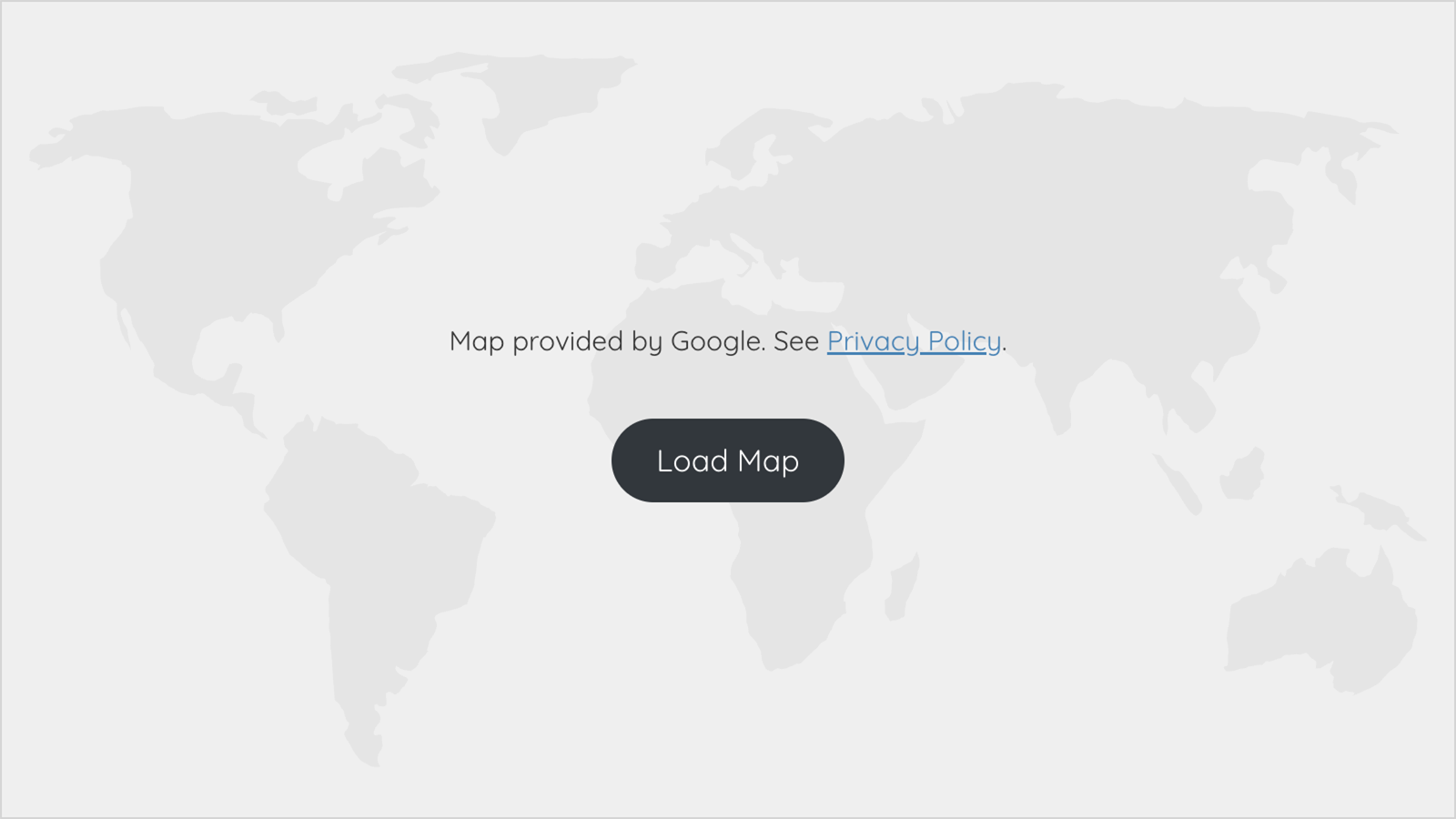
[/ma-content-consent]The page now first displays a notice text with a link to the privacy policy. Below this, a button requests the visitor’s consent to load the external content. Only after clicking the button, a connection to the external server is actually established and the actual content is loaded and displayed.
Functionality and HTML Structure
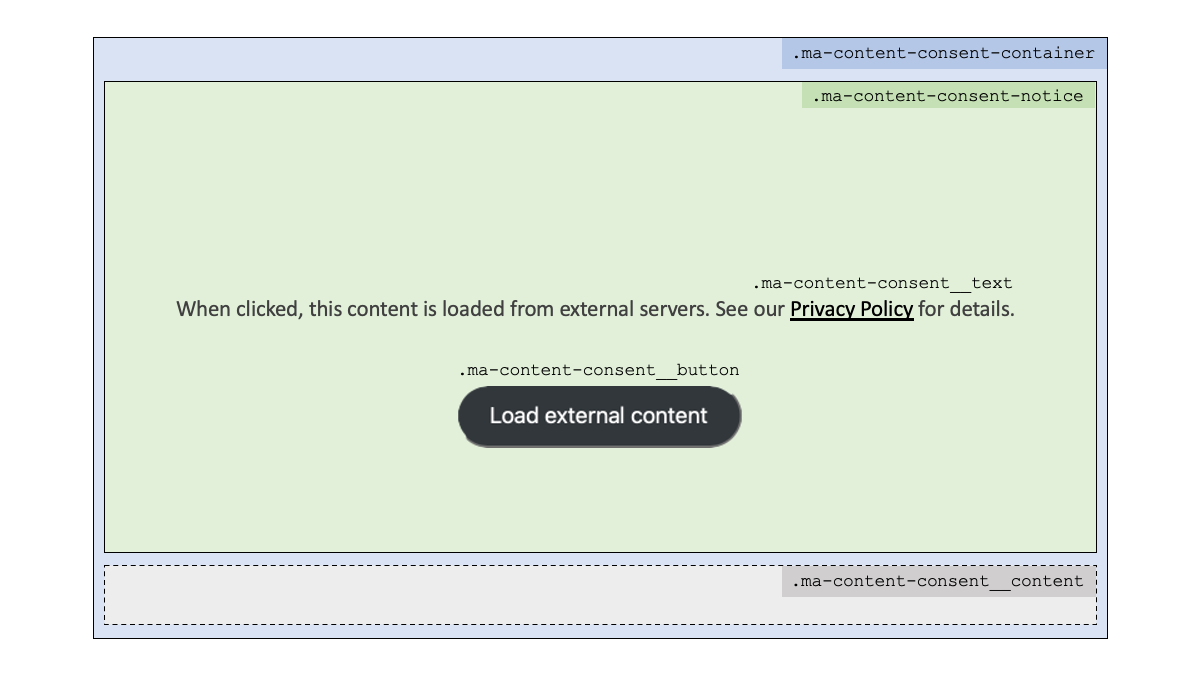
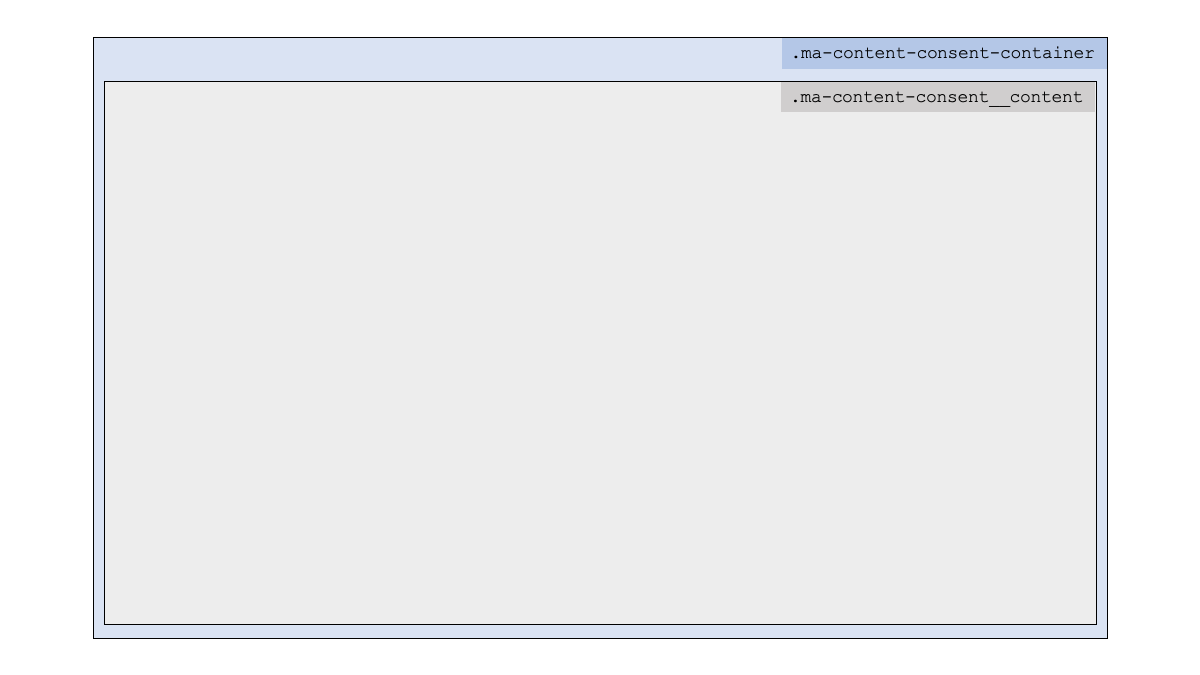
MA Content Consent creates a consent dialog consisting of three main elements: Container, Notice, Content.
The container is the outer main element.
Within that container the notice is displayed, consisting of text and a button.
Below this, the actual content is stored in coded form and initially invisible state.
As soon the visitor agrees, the notice is removed, and gets replaced by the initially invisible content.
Structure before consent
Structure after consent
Shortcode Parameters
MA Content Consent implements a rather simple design for the hint text and the button.
Using shortcode parameters the appearance can be influenced.
id
The id parameter allows you to assign a custom HTML ID to this consent dialog.
This is useful in certain scenarios for specifically targeting the dialog using CSS or JavaScript.
alt / title
The alt and title parameters set the corresponding HTML attributes for the outer consent block.
The alt attribute is used to support search engines and accessibility, the title attribute provides the tooltip text.
Sample:
[ma-content-consent alt="External Content" title="External Content"] ... [/ma-content-consent]container-style
The container block has basic CSS styles assigned by default:
display: flex;
flex-direction: column;
The shortcode parameter container-style can be used to override these CSS styles or add more.
Sample:
[ma-content-consent container-style="min-height: 300px;"] ... [/ma-content-consent]container-class
If multiple container blocks are to have an identical design, CSS classes can be assigned with the container-class parameter.
Sample:
[ma-content-consent container-class="my-consent-container featured"] ... [/ma-content-consent]notice-style
The notice block, containing the privacy text and the button, has basic CSS styles assigned by default:
position: relative;
isolation: isolate;
flex: 1;
padding: 1em;
display: flex;
flex-direction: column;
flex-wrap: wrap;
gap: 2em;
justify-content: center;
background-color: #efefef;
border: 1px solid lightgray;
text-align: center;
The shortcode parameter notice-style can be used to override these CSS styles or add more.
Sample:
[ma-content-consent notice-style="color: maroon;"] ... [/ma-content-consent]notice-class
If multiple notice blocks are to have an identical design, CSS classes can be assigned with the notice-class parameter.
Beispiel:
[ma-content-consent notice-class="my-consent-notice featured"] ... [/ma-content-consent]block-style
This parameter was previously used for the design of the container and has now been replaced by container-style.
If this parameter is still defined from the previous use of the snippet, it overwrites container-style and notice-style for compatibility reasons.
block-class
This parameter was previously used for the design of the container and has now been replaced by container-class.
If this parameter is still defined from the previous use of the snippet, it overwrites container-class and notice-class for compatibility reasons.
gdpr-text
MA Content Consent defines a notice text about the privacy policy in different languages:
| Language | Text |
|---|---|
| DA | Når du har trykket, vil indholdet blive hentet fra eksterne servere. Se vores {privatlivspolitik} for flere informationer. |
| DE | Bei Klick wird dieser Inhalt von externen Servern geladen. Details siehe {Datenschutzerklärung}. |
| EN | When clicked, this content is loaded from external servers. See our {privacy policy} for details. |
| ES | Al hacer clic, este contenido se carga desde servidores externos. Consulte la {política de privacidad} para más detalles. |
| FI | Kun tätä sisältöä napsautetaan, se ladataan ulkoisilta palvelimilta. Lisätietoja on {tietosuojaselosteessa}. |
| FR | En cliquant, ce contenu est chargé depuis des serveurs externes. Voir la {politique de confidentialité}. |
| HU | Ha rákattint, ez a tartalom külső szerverekről töltődik be. A részletekért olvassa el az {Adatkezelési Tájékoztatót} oldalt. |
| IT | Quando viene cliccato, questo contenuto viene caricato da server esterni. Vedere {l’informativa sulla privacy} per i dettagli. |
| JA | ククリックすると、このコンテンツが外部サーバーから読み込まれます。詳細については、{プライバシー ポリシー} をご覧ください。 |
| NL | Na het klikken wordt deze inhoud geladen vanaf externe servers. Zie ons {privacybeleid} voor meer informatie. |
The language is selected based on your website’s or page language. Polylang is supported.
If no default text is available for your page’s language, English is selected instead.
The text in curly brackets is replaced with a link to the privacy policy page configured in WordPress (Settings > Privacy), with the text in brackets serving as the link text.
The notice text can be customized to your own requirements, for example other languages, via parameter gdpr-text.
[ma-content-consent gdpr-text="Please read our |privacy policy} before clicking."] ... [/ma-content-consent]text-style
The notice text has no CSS styles assigned by default.
Using the text-style shortcode parameter, these CSS styles can be added.
Sample:
[ma-content-consent text-style="color: firebrick; font-weight: 900;"] ... [/ma-content-consent]text-class
If text in multiple consent blocks are to have an identical design, CSS classes can be assigned with the text-class parameter.
Sample:
[ma-content-consent text-class="my-text featured"] ... [/ma-content-consent]button-text
MA Content Consent provides the button label in different languages:
| Language | Text |
|---|---|
| DA | Indlæs eksternt indhold |
| DE | Externen Inhalt laden |
| EN | Load external content |
| ES | Cargar contenido externo |
| FI | Lataa ulkoista sisältöä |
| FR | Charger le contenu externe |
| HU | Külső tartalom betöltése |
| IT | Caricare il contenuto esterno |
| JA | 外部のコンテンツを読み込ませます。 |
| NL | Externe inhoud laden |
The language is selected based on your website’s or page language. Polylang is supported.
If no default text is available for your page’s language, English is selected instead.
The notice text can be customized to your own requirements, for example other languages, via parameter button-text.
Sample:
[ma-content-consent button-text="Load Map"] ... [/ma-content-consent]button-style
The button has basic CSS styles assigned by default:
margin-inline: auto;
width: fit-content;
border-style: none;
border-radius: 1.5em;
background-color: #333;
padding: 0.5em 1em;
color: white;
text-decoration: none;
You can use the button-style shortcode parameter to customize the button’s design.
Sample:
[ma-content-consent button-style="background-color:#2a4b9b; padding:2px 10px; border-radius:5px;"] ... [/ma-content-consent]button-class
If buttons in multiple consent blocks are to have an identical design, CSS classes can be assigned with the button-class parameter.
Sample:
[ma-content-consent button-class="my-button primary"] ... [/ma-content-consent]background-image
With the shortcode parameter background-image, a background image can be assigned to the notice container.
The parameter accepts a URL or a media ID.
Samples:
[ma-content-consent background-image="/wp-content/..."]
...
[/ma-content-consent][ma-content-consent background-image="1234"]
...
[/ma-content-consent]background-style
The background area has basic CSS styles assigned by default::
z-index: -1;
position: absolute;
inset: 0;
opacity: .5;
background-size: cover;
background-position: center center;
background-repeat: no-repeat;
The shortcode parameter background-style can be used to override these CSS styles or add more.
Included Background Images
MA Content Consent already provides some integrated background images for typical use cases. These can be assigned using tags in the format @name.
[ma-content-consent background-image="@form"]
Beispiel-Inhalt
[/ma-content-consent][ma-content-consent background-image="@play"]
Beispiel-Inhalt
[/ma-content-consent][ma-content-consent background-image="@video"]
Beispiel-Inhalt
[/ma-content-consent][ma-content-consent background-image="@waveform"]
Beispiel-Inhalt
[/ma-content-consent][ma-content-consent background-image="@world""]
Beispiel-Inhalt
[/ma-content-consent]Global Parameters
All shortcode parameters can be defined globally.
This simplifies the uniform design of the consent dialogs and spares the definition of the parameters for each individual dialog.
For this purpose, a global variable $GLOBALS[' is created as an array and supplied with the desired settings.ma_content_consent']
This can be done quite easily with a code snippet with e.g. the following content:
$GLOBALS['ma_content_consent'] = [
 'background-image' => '@world',
 'container-style' => 'border: 1px solid blue;',
];
A special solution applies here to the gdpr-text and button-text parameters, which are language-sensitive.
The specification of a global parameter gdpr-text and button-text sets the text and button text globally to a uniform value.
The addition of a language flag controls the text output per language.
$GLOBALS['ma_content_consent'] = [
 'gdpr-text' => 'Loading map from Google. Read the {privacy policy}.',
 'gdpr-text-de' => 'Karte wird von Google geladen. Siehe {Datenschutzerklärung}.',
 'button-text' => 'Load Map',
 'button-text-de' => 'Karte laden',
];
Settings
WordPress Admin Menu > Settings > MA Content Consent displays the administration pages where you can manage the shortcode settings.
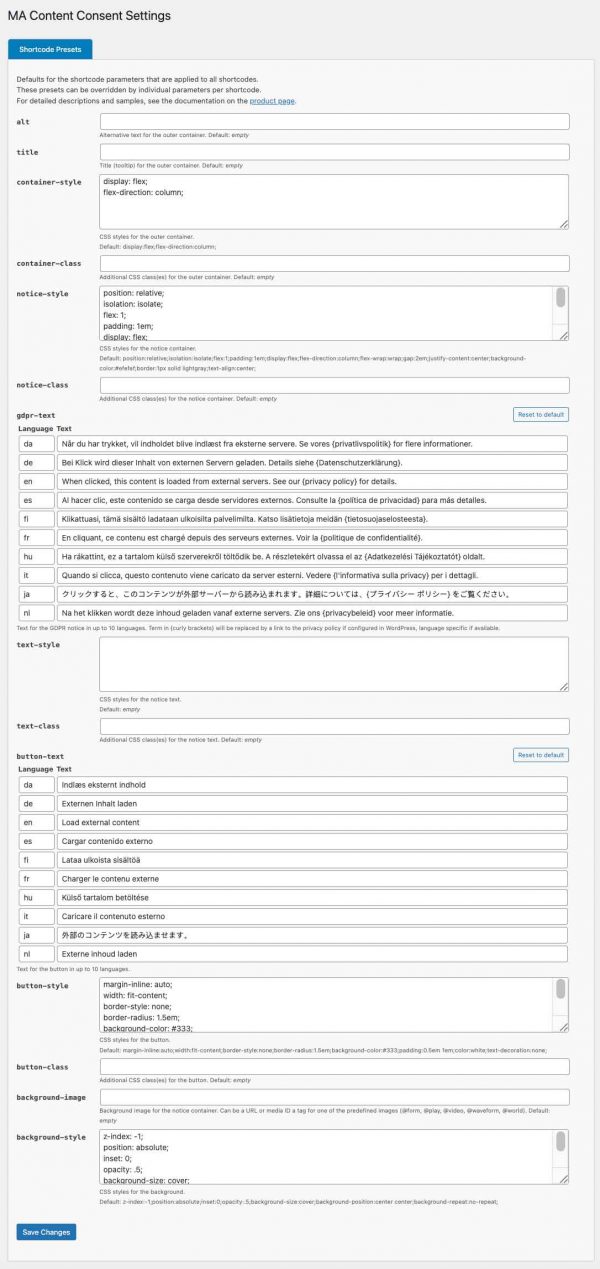
Shortcode Presets
On this page, you can set global defaults for shortcodes.
For example, if you want to apply a specific style throughout the entire website, you can specify it here centrally rather than as a parameter for each individual shortcode.
However, these global defaults can be overridden for individual shortcodes using parameters if necessary.
Tip:
The gdpr-text and the button-text can be provided in up to 10 languages.
If another language is needed, you can simply overwrite an existing language.
Software Installation and Updates
Installation
The software can be installed using various methods:
Plugin:
The software is available as a plugin (ZIP archive) and can be installed in WordPress as a plugin.
Code Snippet:
The software can be run as a code snippet.
For the “Code Snippets” and “Advanced Scripts” plugins, a JSON file is available for download that can be directly imported there.
PHP:
The software can be downloaded as a PHP file.
This PHP file can be used in other code snippet plugins (copy & paste the code) or be included in your own WordPress child theme (require_once('path/to/the.php');).
Updates
The software automatically checks for available updates:
Plugin:
The update process follows standard WordPress methods: It checks for a new version every 12 hours.
The update can then be performed manually or automatically.

Code Snippet & PHP:
The software implements a special method that checks for updates even when installed as a snippet or PHP include. As with plugins, the check interval is set to 12 hours.
If a newer version is available, a notification will be shown in the admin area.

Download
Donation ❤️
I enjoy developing software and solving typical requirements with them.
The software is provided for free use.
If you like, you can honor my many hours of work with a small coffee donation via PayPal.
When clicking the button, a connection to PayPal is established.
Your donation will, of course, be taxed properly by me.
Disclaimer
I have developed and tested this software to the best of my knowledge.
I provide the software for free use.
I cannot give any guarantee for the functionality because of the countless possible variations in WordPress environments.
Download and use this software at your own risk and responsibility.
Change Log
- Version 2.0.3August 14, 2026Requires At Least WordPress: 5.8•Tested Up To WordPress: 7.0.4•Requires PHP: 7.4
Fixes:
- Presets: Setting background-style was not saved
- Presets: Fixed form value check for text and select fields, and gdpr-text and button-text lists
- Settings via $GLOBALS: Fixed mapping of deprecated ['text-{lang}'] to new ['gdpr-text-{lang}]
- Consistent attribute esacping when building output from settings
- Lowered default CSS specificity from {0,1,0} to {0,0,0} to allow styling via theme styles
- Restored full opacity (from .5) for custom background images for backwards consistency with versions < 2.0
(Thanks to Tobias, NETZLICHT webdesign, for analysis, reporting, solution suggestions for all the topics above.)
Changes:
- Settings page now uses dynamic field-sizing for style fields
Tested:
- WordPress 7.0.4
- Bricks 2.3.11
- Version 2.0.2Download not available.--Requires At Least WordPress: 5.8•Tested Up To WordPress: 7.0.4•Requires PHP: 7.4
Preliminary test version. Not published.
- Version 2.0.1May 21, 2026Requires At Least WordPress: 5.8•Tested Up To WordPress: 7.0•Requires PHP: 7.4
Changes:
- Moved plugin updater methods to separate class to reduce code snippet size
Tested:
- PHP 8.5
- WordPress 7.0
- Bricks 2.3.5
- Version 2.0.0Download not available.May 12, 2026Requires At Least WordPress: 5.8•Tested Up To WordPress: 6.9.4•Requires PHP: 7.4
New Features:
- Now available as Code Snippet, Include, and Plugin with automatic update check.
For snippet or include, checks for updates every 12 hrs (same frequency used by WP for plugin updates),
and shows update notice in admin area, dismissible for 12 hrs. Can also be checked manually on the Settings page.
For plugin, WordPress standard update mechanism is used. - Settings > MA Content Consent
- Configure presets values for shortcode parameters
- New shortcode attributes 'id', 'background-style'
- Attribute 'background-image' now also accepts a numeric value for media ID
Changes:
- Changed shortcode attribute name "text" to "gdpr-text", to match attribute name of my other gdpr plugins.
Attribute name "text" is still supported as a fallback for existing setups, but will be removed in a future version. - Changed default text-site from .7em to 1em
- Backgroudn image:
- Moved background-image property from notice container to a new absolutely positioned div for opacity control
- Added background-style parameter, default opacity .5
- Now available as Code Snippet, Include, and Plugin with automatic update check.
- Version 1.3.2Download not available.April 28, 2025Requires At Least WordPress: 5.3•Tested Up To WordPress: 6.9•Requires PHP: 7.4
Changes:
- Compatibility with WordPress 6.8: Button width/height
(Thanks to Tobias Schmidt for reporting)
- Compatibility with WordPress 6.8: Button width/height
- Version 1.3.1Download not available.March 1, 2024
Changes:
- Content parser now collects scripts that might have been moved to head by DOMParser.
(Thanks to Tobias Schmidt for reporting)
- Content parser now collects scripts that might have been moved to head by DOMParser.
- Version 1.3.0Download not available.January 19, 2024
Structural changes in V1.2.0 made styling the block, especially dimensions, way more complicated or even impossible.
A new structure with container and notice blocks, and related attributes, now allows more specific styling.
Also, the consented contents are not embedded in an additional div anymore.Changes:
- New Attributes container-class, container-style, notice-class, notice-style
- Attributes block-class and block-style are now deprecated.
If still present, will replace container-class/style and notice-class/style - Default styles are now assigned to classes ma-content-consent-container and ma-content-consent-notice instead of inline CSS
- Replace contents of container directly with nodes, not nested in an additional div
New Features:
- Added global configuration via
$GLOBALS['ma_content_consent']
- Version 1.2.0Download not available.December 30, 2023
New Features:
- Complete rebuild of JS
- Added shortcode attributes alt, title
- SVG backgrounds included: form, play, video, waveform, world.
SVG symbols are only emitted to the page if used by a consent element. - Support for <script> tags embedded in hidden content
- Support for dynamically embedded deferred content using AJAX calls
- Removed init prevention for AJAX calls
- Added PHP method MA_Content_Consent::enable_footercode() to trigger output of footer code (styles, scripts, svg) for consent dialogs dynamically loaded by AJAX calls
- Added JS function ma_content_consent_init_click_handler() to initialize click handlers for dynamically created consent dialogs.
- Optimizations for accessibility
- Version 1.1.2Download not available.February 1, 2023
New Features:
- Added Finnish translations for notice text and button label
Changes:
- Changed button tag from <a> to <span> to avoid Lighthouse SEO warning "Links not crawlable"
Fixes:
- Support for Oxygen Repeater (due to numbered IDs)
(Thanks to André Slotta for reporting and supporting with code adaptions)
- Version 1.1.1Download not available.November 15, 2022
New Features:
- Added Japanese translations for notice text and button label
(Thanks to Viorel-Cosmin Miron) - Added support for WPML
(Thanks to Viorel-Cosmin Miron)
Please note there's a WPML bug preventing the creation a policy link with the correct language
(https://wpml.org/forums/topic/get_the_privacy_policy_link-should-be-translated/#post-8153387)
Fixes:
- Support for UTF-8 content in JS base64 decoding
(Thanks to Tobias Przybilla for reporting)
- Added Japanese translations for notice text and button label
- Version 1.1.0Download not available.October 21, 2022
New Features:
- Added new shortcode parameters block-class, text-class, button-class
Changes:
- Migrated JavaScript from jQuery to vanilla JS (ES6) to eliminate jQuery dependency.
(Thanks to André Slotta for the provided code sample)
Fixes:
- Removed double '.' for German GDPR text.
(Thanks to Tobias Maximilian Hietsch for reporting)
- Version 1.0.1Download not available.February 4, 2022
New Features:
- Added Dansk translations for notice text and button label
(Thanks to Theis L. Soelberg) - Evaluating nested shortcodes
(Thanks to Anja Kretzer)
- Added Dansk translations for notice text and button label
- Version 1.0.0Download not available.February 3, 2022
Initial release